
AI Customer Service Automation: How It Works, Key Benefits & Use Cases



Customer service teams are under more pressure than ever. Response time expectations have dropped sharply. Customers want answers now, not in a few hours, not after navigating three menu options on a phone system. And the businesses that can't keep up are losing customers quietly, one frustrating interaction at a time.
The volume of inbound queries hasn't slowed down either. If anything, it's grown across email, phone, chat, WhatsApp, and social media simultaneously. Managing all of this with a human team alone is expensive, inconsistent, and, honestly, unsustainable at scale.
That's where AI customer service automation comes in. It's not about replacing human agents; it's about removing the repetitive, predictable work from their plates so they can focus on the interactions that actually need a human touch.
The shift happening right now isn't just about adding a chatbot to your website. It's a deeper change from reactive customer service (waiting for problems to arrive) to proactive, intelligent support that anticipates needs, resolves issues faster, and works around the clock without burning out.
This guide covers everything you need to know about AI customer service - what it is, how it works, the real benefits, where it applies, and how to actually implement it. Whether you're evaluating it for the first time or looking to expand an existing setup, this is a practical resource built for decision-makers, not just tech teams.
What Is AI Customer Service Automation?
AI customer service automation refers to the use of artificial intelligence to handle, route, and resolve customer interactions without requiring a human agent for every single touchpoint. It can manage conversations across voice, chat, email, and messaging channels either fully autonomously or in combination with human agents.
The core idea is straightforward: if a customer's query follows a predictable pattern, checking an order status, rescheduling an appointment, asking about pricing, AI can handle it faster and more consistently than a human, at any hour of the day.
How AI customer service automation differs from traditional support
Traditional support relies on human agents to manually respond to every query, which creates bottlenecks during peak hours and drives up operational costs as the business grows. AI automation handles volume at scale without those constraints; it doesn't need breaks, doesn't get overwhelmed, and doesn't deliver inconsistent answers based on who picks up the phone.
The difference isn't just speed. Traditional support waits for a customer to raise a problem. AI-powered customer support can be proactive, flagging potential issues before they escalate, sending reminders, or following up automatically after a resolution.
The evolution from basic chatbots to intelligent AI agents
Early chatbots were rule-based; they followed decision trees and fell apart the moment a customer asked something slightly off-script. Most people who used them in the early 2010s still cringe a little at the memory.
Modern AI agents are fundamentally different. They understand natural language, learn from past interactions, handle multi-turn conversations, and can take real actions such as updating a booking, processing a refund request, or routing a complaint to the right department, with context already attached.
Where AI customer service automation fits in modern business operations
It sits between the customer and your human team, handling the high-volume, repetitive layer of support so your agents can focus on complex, high-value, or emotionally sensitive interactions. Think of it less as a replacement and more as the first line of your support operation.
How AI Customer Service Automation Works
Let's walk through what actually happens when a customer reaches out through an AI-powered system.
How AI handles an inbound customer query end-to-end
A customer sends a message or places a call. The AI receives it, processes the language to understand intent, checks relevant data sources (order management system, CRM, knowledge base), and generates a response all within seconds. If it can resolve the query, it does. If it can't, it escalates.
Ticket Creation, Routing, and Resolution Workflow
For queries that need tracking or human follow-up, the AI automatically creates a support ticket, categorises it, assigns it a priority level, and routes it to the right team or agent with a full conversation log already attached. No manual triage needed.
Escalation to Human Agents When Needed
Good AI knows its limits. When a query is too complex, too sensitive, or the customer is clearly frustrated, the system escalates, handing off to a human agent with full context intact. The agent doesn't start from scratch; they pick up exactly where the AI left off.
Learning and Improving from Every Interaction
Every resolved query, every escalation, and every piece of customer feedback feeds back into the system. Over time, the AI gets better at recognising patterns, handling edge cases, and reducing the number of interactions that need human intervention.
Real-Time Data Sync Across Channels
When a customer updates their delivery address via chat, that change reflects immediately in the CRM and order system. When they call five minutes later, the voice AI already has the updated information. Real-time sync eliminates the data lag that creates so many service failures in traditional setups.
Why Businesses Need AI for Customer Service in 2026
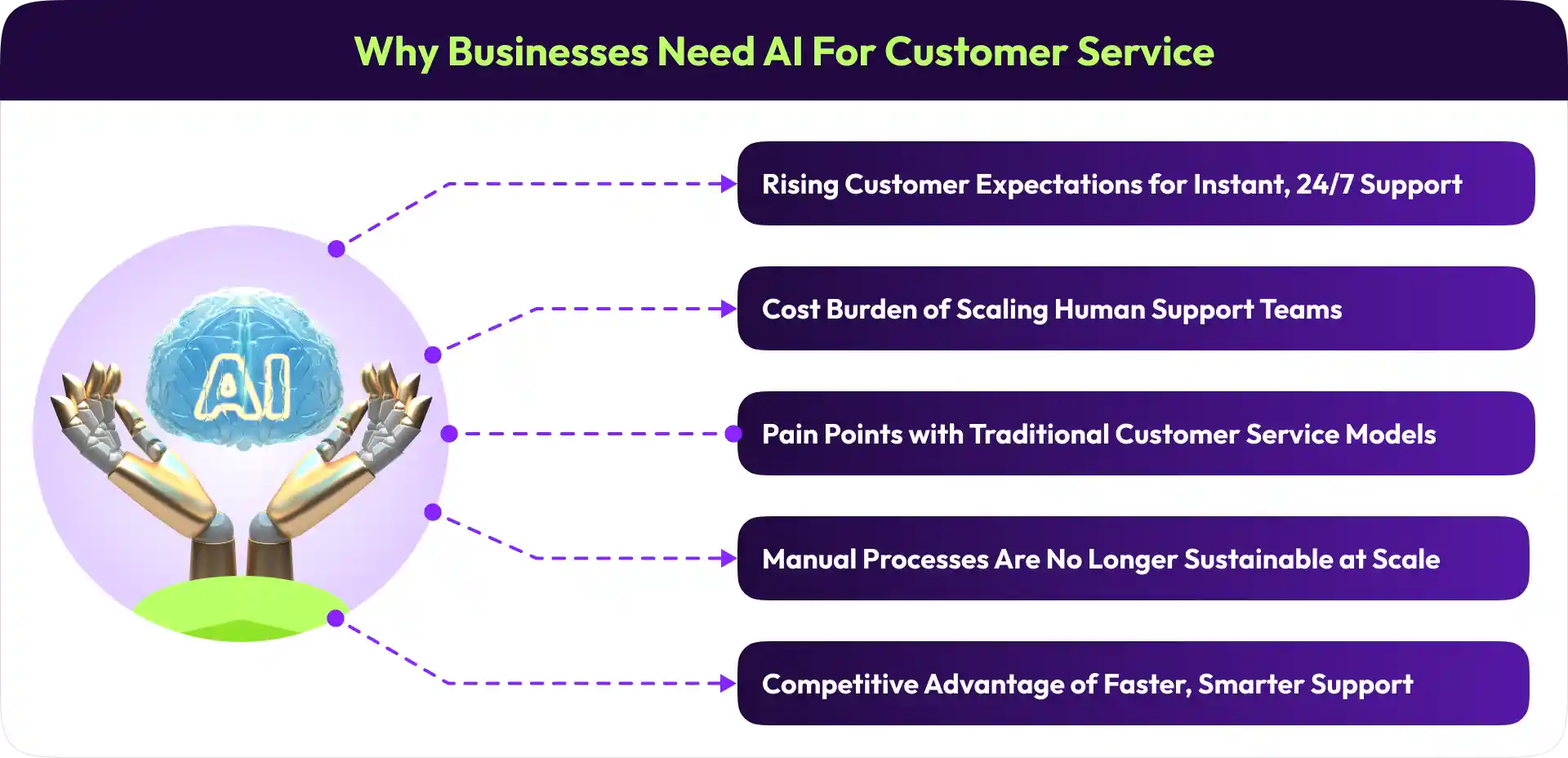
1. Rising Customer Expectations for Instant, 24/7 Support
Customers don't think about business hours anymore. They expect support when they need it at 11 PM on a Sunday, during a holiday weekend, during your peak season, when your team is already stretched. Businesses that only offer 9-to-5 support are creating friction at the exact moment customers need help most.
2. The Cost Burden of Scaling Human Support Teams
Hiring, training, and retaining support staff is expensive. And when demand spikes seasonally or through growth scaling, a human team takes weeks, not hours. AI scales instantly. You don't pay per interaction; you pay for the platform, and it handles ten thousand queries just as easily as ten.
3. Common Pain Points with Traditional Customer Service Models
Long wait times, inconsistent answers across agents, information lost between channels, agents spending 40% of their day on repetitive queries they've answered a hundred times before, these aren't edge cases. They're the default experience for many businesses still running manual support.
4. Manual Processes Are No Longer Sustainable at Scale
As customer bases grow and channel complexity increases, manual processes don't just slow down; they break. A team that handled 500 queries a week comfortably will start missing SLAs at 1,500. AI doesn't have that ceiling.
5. The Competitive Advantage of Faster, Smarter Support
Businesses using AI customer service automation are resolving issues faster, retaining more customers, and freeing their human teams for work that actually requires human judgment. In competitive markets, that gap in service quality is increasingly the difference between a customer who stays and one who doesn't.
Key Benefits of AI Customer Service Automation
24/7 Availability Without Additional Staffing Costs
Your AI support doesn't clock out. It handles queries at 3 AM with the same accuracy as midday on a Tuesday without overtime costs, without staffing gaps during holidays, and without the quality inconsistencies that come with fatigue.
Faster Response and Resolution Times
AI responds in seconds, not minutes or hours. For routine queries, which make up the majority of most support queues, speed alone significantly improves customer satisfaction scores.
Consistent and Accurate Customer Interactions
Human agents have good days and bad days. AI doesn't. Every customer gets the same quality of response, the same accurate information, and the same tone regardless of queue length, time of day, or how difficult the previous interaction was.
Reduced Operational Costs and Support Overhead
Automating even 50% of inbound queries reduces the volume your human team handles significantly. That translates to lower staffing costs, reduced training overhead, and better ROI per agent because they're spending their time on work that actually requires their skills.
Improved Agent Productivity and Reduced Burnout
Nobody goes into customer service to answer the same question five hundred times a week. When AI handles repetitive queries, agents get to focus on complex problem-solving and genuine customer relationships. That's better for productivity and, frankly, better for team morale and retention.
Scalability During Peak Demand Periods
Black Friday, product launches, seasonal spikes, these moments traditionally overwhelm support teams. AI scales elastically. You don't need to hire temp staff two weeks in advance; the system handles the surge automatically.
Better Customer Satisfaction and Retention
Faster resolution, consistent answers, and 24/7 availability, all of these individually improve CSAT scores. Together, they build the kind of support experience customers actually remember positively, which directly impacts retention and word-of-mouth.
AI Customer Support Automation: Core Use Cases
1. Handling Frequently Asked Questions Automatically
FAQs make up a disproportionate share of most support queues, including pricing, return policies, opening hours, and how to reset a password. AI resolves all of these instantly, without queuing. Your team never has to answer "what are your business hours" again.
2. Order Tracking, Status Updates, and Delivery Queries
"Where is my order?" is consistently one of the highest-volume queries for any business shipping physical products. AI integrates with your order management system to pull real-time status updates and deliver them instantly, no human required.
3. Appointment Scheduling and Booking Management
AI can handle the full booking cycle, taking new appointments, sending reminders, processing reschedules and cancellations, and filling open slots from a waitlist. This applies across industries, from healthcare practices to salons to service businesses.
4. Billing Inquiries and Payment Support
Balance queries, payment due dates, invoice requests, and failed payment explanations; all of these follow predictable patterns and are ideal for automation. AI handles them accurately without exposing sensitive data to unnecessary human touchpoints.
5. Complaint Handling and Issue Resolution
AI can manage the initial intake of complaints, logging the issue, setting expectations, triggering resolution workflows, and escalating to a human when the complexity or emotional weight warrants it. Customers feel heard faster, even when resolution takes time.
6. Lead Qualification and Customer Onboarding
On the inbound side, AI can qualify leads by asking the right questions, capturing relevant details, and handing a warm, context-rich lead to your sales team. For new customers, it can guide them through onboarding steps, answer setup questions, and reduce early churn from confusion.
7. Post-Interaction Follow-Ups and Feedback Collection
After a support interaction closes, AI can automatically send a follow-up to confirm resolution, collect a satisfaction rating, or check in a few days later. These touchpoints improve data quality, catch unresolved issues early, and signal to customers that the business actually cares.

AI Customer Service Automation Across Industries
AI in customer service isn't limited to one sector. Here's how it applies across the most common use cases by industry.
Retail and E-commerce
Order tracking, return requests, product queries, and delivery issues dominate retail support queues. AI handles all of these at scale, especially critical during high-volume sales periods when human teams simply can't keep up.
Healthcare and Medical Practices
Appointment scheduling, prescription reminders, insurance queries, and follow-up communications are routine tasks that consume significant front-desk time. AI handles them efficiently while staying within compliance boundaries, no sensitive clinical decisions, just administrative automation.
Financial Services
Banks and financial service providers use AI to handle balance inquiries, transaction disputes, fraud alerts, loan status updates, and account management queries, all with appropriate security protocols and escalation paths for sensitive issues.
Insurance
Policy queries, claims status updates, renewal reminders, and document requests are high-volume, low-complexity tasks that AI handles well. It frees insurance agents to focus on new business and complex claims rather than answering the same coverage questions daily.
Telecommunications
Telecom companies deal with enormous support volume, billing disputes, service outages, plan changes, and technical troubleshooting. AI handles tier-1 support efficiently and reduces call centre strain, particularly during outage events when query volumes spike suddenly.
Hospitality and Travel
Booking confirmations, check-in queries, cancellation policies, and room preference updates are run by hospitality businesses on these interactions. AI handles them across multiple languages and time zones, which matters when your customers are travelling internationally.
Real Estate and Property Management
Property enquiries, viewing scheduling, maintenance request logging, and rental queries are all predictable enough for automation. AI handles initial qualification and booking, so agents focus on relationship-building and closing, not administrative intake.
SaaS and Technology Companies
SaaS businesses deal with technical support queries, subscription management, onboarding help, and integration questions at scale. AI handles tier-1 support password resets, feature explanations, and billing queries, while escalating technical bugs and custom configurations to engineering or success teams.
Omnichannel AI Customer Service: Meeting Customers Where They Are
Why Channel Coverage Matters in 2026
Customers don't pick one channel and stick with it. They might send a WhatsApp message today, call tomorrow, and email later in the week about the same issue. If your support system treats these as separate conversations, you're creating friction and making your customers repeat themselves. That's irritating, and it erodes trust.
Voice Calls and AI Phone Agents
Phone remains one of the most-used support channels, especially for complex or urgent queries. AI voice agents handle inbound calls conversationally, no press-1 menus, no hold music for routine requests. They answer questions, take bookings, and transfer to a human when the conversation genuinely needs one.
Live Chat and Website Widgets
Website chat is often the first touchpoint for new customers. AI handles it instantly, answering questions, qualifying leads, and guiding visitors toward the right next step without making them wait for a live agent to become available.
SMS and WhatsApp Automation
Messaging apps have become a preferred channel for many customers, particularly for follow-ups and reminders. AI handles inbound messages on SMS and WhatsApp, sends proactive notifications, and maintains two-way conversations that feel natural rather than robotic.
Email Support Automation
AI can triage inbound support emails, categorise them by intent and urgency, auto-respond to common queries, and draft responses for complex ones that need human review. Response time drops significantly, and nothing gets buried in a crowded inbox.
Social Media Customer Service
Customers increasingly raise support issues on Instagram, Facebook, and X publicly, where visibility matters. AI monitors mentions and DMs, responds to common queries, and flags issues requiring human attention before they escalate into public complaints.
The Importance of a Unified Omnichannel Experience
The real value of omnichannel AI isn't just being present on every channel; it's maintaining a single, coherent view of each customer across all of them. When your AI knows that the customer calling in this afternoon already sent a chat message this morning, the interaction starts from the right place. That continuity is what separates a good support experience from a genuinely excellent one.
AI Agents for Customer Service: The Next Evolution
What AI Agents Are and How They Differ from Chatbots
A chatbot answers questions. An AI agent takes actions. That's the core distinction. Where a chatbot might tell a customer, "You can cancel your subscription in account settings," an AI agent can actually process the cancellation, trigger the confirmation email, and flag a retention offer all in the same conversation.
How AI Agents Handle Complex, Multi-Step Customer Interactions
AI agents can hold the thread of a multi-step conversation, checking account status, verifying identity, pulling order history, making a change, and confirming it without losing context between steps. They don't just answer the surface question; they resolve the underlying issue.
Autonomous Decision-Making vs Rule-Based Automation
Rule-based automation follows fixed scripts if X, then Y. It breaks when reality doesn't follow the script. AI agents make contextual decisions based on available data, conversation history, and learned patterns. They handle the unexpected without needing a rule written for every scenario.
When AI Agents Outperform Traditional Support Workflows
For high-volume, repetitive interactions where accuracy and speed matter more than emotional nuance, AI agents outperform traditional workflows consistently. They're also better at maintaining consistency across thousands of simultaneous conversations, which no human team can match.
Human-in-the-Loop: When and How to Involve Human Agents
The best AI customer service setups aren't fully autonomous; they know when to hand off. Emotional complaints, legal queries, medical questions, and high-value customer issues need a human. A well-designed system escalates smoothly, gives the human agent full context, and makes the transition invisible to the customer.
How to Implement AI for Customer Service Automation
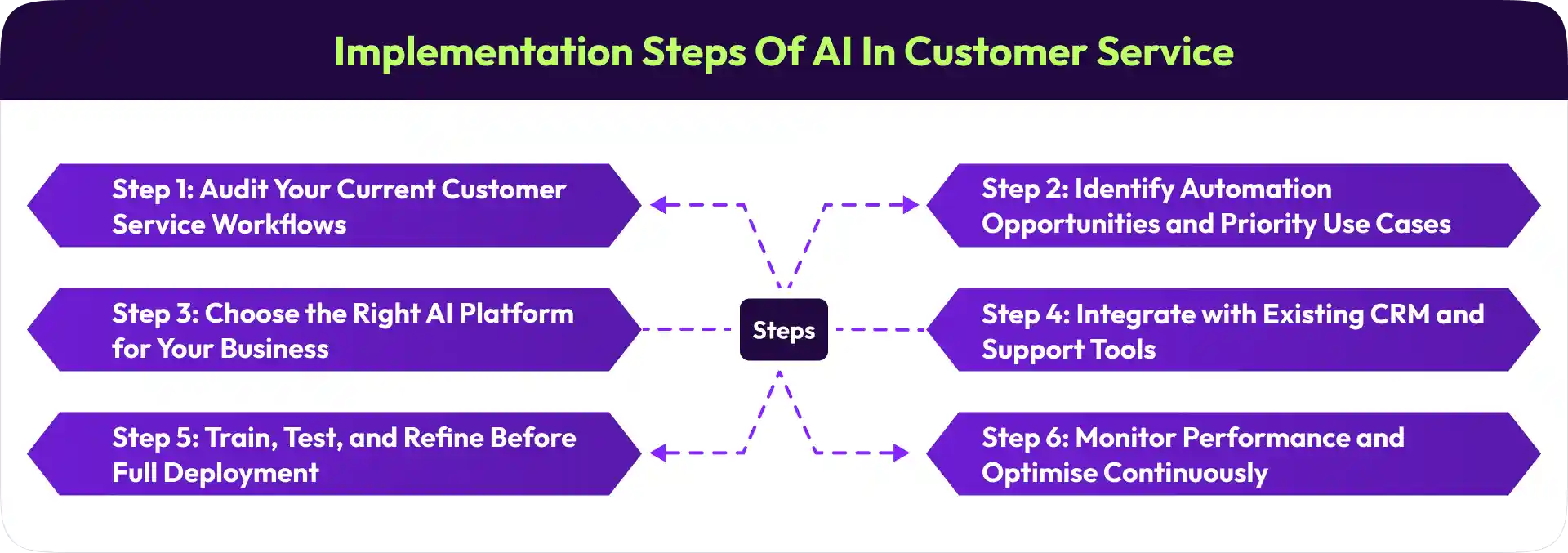
Step 1: Audit Your Current Customer Service Workflows
Before choosing any tool, understand what's happening in your current setup. Map your inbound query types, volume by channel, resolution rates, and where your team spends the most time. This gives you a clear picture of where automation will have the highest impact.
Step 2: Identify Automation Opportunities and Priority Use Cases
Not everything should be automated at once. Start with the highest-volume, most repetitive query types, usually FAQs, order status, and appointment management. These give you quick wins and free up capacity for the more complex integration work that follows.
Step 3: Choose the Right AI Platform for Your Business
This is probably the most important decision in the process. Look for a platform that covers all your relevant channels, integrates with your existing tools, and can scale with your business.
Alris AI, for example, is built for exactly this. It's an omnichannel AI communication platform that handles voice, SMS, WhatsApp, email, and chat in one unified system. Rather than stitching together separate tools for each channel, Alris AI gives you a single platform where conversations flow seamlessly across touchpoints, with full context maintained throughout. That kind of integration is hard to retrofit later; it's worth prioritising at the selection stage.
Step 4: Integrate with Existing CRM and Support Tools
Your AI platform needs to talk to your CRM, helpdesk, order management system, and any other tools your support team uses. Without these integrations, the AI is answering questions in a vacuum; it can't pull customer history, update records, or trigger workflows. Integration depth is often what separates a useful AI deployment from a genuinely transformative one.
Step 5: Train, Test, and Refine Before Full Deployment
Run the system on a subset of real interactions before going live at full scale. Test edge cases, monitor escalation rates, and review conversations where the AI misunderstood intent. Refinement at this stage prevents the kind of early failures that damage customer trust and make internal adoption harder.
Step 6: Monitor Performance and Optimise Continuously
Implementation isn't a one-time event. Set up dashboards for key metrics resolution rate, escalation rate, CSAT, and response time, and review them regularly. The system should be getting better over time. If it's not, something in the training data, escalation logic, or integration setup needs attention.
Key Features to Look for in AI Customer Service Software
Not all AI customer service platforms are built equally. Here's what actually matters when evaluating options.
Natural Language Understanding and Conversational Ability
The system should understand how customers actually write and speak with typos, slang, incomplete sentences, and regional variations. If it only handles perfectly phrased queries, it'll frustrate more customers than it helps.
Omnichannel Support Coverage
Check which channels the platform covers natively: voice, chat, email, SMS, WhatsApp, and social. More importantly, check whether context carries across channels or whether each one operates independently. True omnichannel means unified, not just multi-channel.
CRM and Helpdesk Integration
Out-of-the-box integrations with the tools you already use, Salesforce, HubSpot, Zendesk, and Freshdesk, reduce implementation complexity significantly. Custom API access matters for more specific needs, but pre-built connectors speed up deployment considerably.
Real-Time Analytics and Reporting Dashboard
You need visibility into what the AI is doing, query volumes, resolution rates, escalation triggers, channel performance, and customer satisfaction trends. A good dashboard makes this clear without requiring you to dig through raw data.
Escalation and Handoff Management
The escalation process needs to be smooth, not just technically, but from the customer's perspective. Look for platforms that transfer conversations with full context, notify the right agent, and make the handoff feel like a continuation rather than a reset.
Security, Compliance, and Data Privacy Capabilities
Customer data passing through an AI support system needs to be handled securely. Look for SOC 2 compliance, GDPR-ready data handling, role-based access controls, and clear audit trails. For regulated industries, verify sector-specific compliance requirements.
Customisation and Workflow Flexibility
Every business has different workflows, tones, escalation rules, and edge cases. The platform should be configurable enough to match your specific needs, not force you to adapt your processes to fit its defaults.
Multi-Language Support
If you serve customers across geographies, multi-language support isn't optional. Verify that the platform handles your relevant languages natively, not just through basic translation, but with genuine conversational capability in each language.
Measuring the Success of AI Customer Service Automation
You can't improve what you don't measure. These are the metrics that actually tell you whether your AI customer service setup is working.
First Contact Resolution Rate
The percentage of queries resolved in a single interaction without escalation or follow-up. This is your most direct measure of AI effectiveness high FCR means customers are getting answers, not just responses.
Average Handling Time
How long does it take to resolve an interaction from first contact to close? AI should bring this down significantly for routine queries. Track it separately for AI-handled and human-handled conversations to see where the time is actually going.
Customer Satisfaction Score (CSAT)
Post-interaction surveys are the clearest signal of customer experience quality. Watch for any drop in CSAT after AI deployment, it usually indicates the system is handling queries it shouldn't, or escalating too slowly when customers are frustrated.
Cost per Interaction
Total support cost divided by the number of interactions handled. AI should reduce this considerably over time. Track it against pre-automation baselines to demonstrate ROI clearly.
Automation Rate and Deflection Rate
Automation rate measures the percentage of queries handled entirely by AI without human involvement. Deflection rate measures how many interactions were resolved before reaching a human agent. Both matter, but balance them against CSAT. A high deflection rate with dropping satisfaction scores means you're deflecting too aggressively.
Agent Productivity Metrics
Are your human agents handling more complex queries? Are resolution rates improving for the interactions that reach them? These metrics tell you whether AI is actually freeing up capacity or just shifting the queue.
Customer Retention and Churn Indicators
Ultimately, good customer service keeps customers. Track churn rates and renewal rates alongside your support metrics. If service quality is improving, it should eventually show up in retention data.
Common Challenges and How to Overcome Them
Resistance to AI Adoption Among Support Teams
This is real, and it's worth taking seriously. Support agents worry AI will replace them. Addressing this early honestly, with specifics about what will change and what won't matter more than most implementation teams expect. The message should be clear: AI handles the repetitive work so agents focus on more meaningful interactions, not that AI is replacing headcount.
Maintaining a Human and Empathetic Tone in Automated Interactions
Robotic, scripted-sounding responses damage customer relationships. Invest time in how the AI communicates the tone, the language, and the way it handles frustration. Good AI customer service doesn't feel like AI to the customer.
Integrating AI with Legacy Systems and Tools
Older CRM systems, on-premise databases, and siloed tools make integration harder than it needs to be. This is where implementation timelines often slip. Factor integration complexity into your platform selection, and if your existing stack is fragmented, address that before expecting AI to fix it.
Managing Data Privacy and Compliance Requirements
Customer data flowing through AI systems needs careful handling, consent management, data retention policies, access controls, and audit trails. This is especially important in regulated industries. Build compliance requirements into your platform evaluation, not as an afterthought.
Avoiding Over-Automation and Knowing When Humans Are Essential
The temptation to automate everything is understandable, but it's a mistake. Some interactions need a human: bereavement-related queries, medical situations, complex complaints, and high-value relationships. Build clear escalation rules from the start, and revisit them regularly.
Best Practices for Long-Term Success
Review AI performance data monthly, not just at launch
Keep escalation paths up to date as your support workflows evolve
Train the AI on new products, policies, and scenarios as your business changes
Collect feedback from both customers and agents regularly
AI customer service automation works best when it's treated as an ongoing system, not a deployment that's done once and forgotten.
The Future of AI in Customer Service
Predictive Customer Service Before Issues Arise
The next frontier is proactive support AI that detects a potential issue before the customer even notices it and reaches out first. A delivery delayed by weather, a payment about to fail, a subscription approaching renewal, AI that gets ahead of these moments, fundamentally changes the support experience.
Hyper-Personalised Support Experiences
As AI systems accumulate more customer history, they'll deliver increasingly personalised interactions, remembering past issues, anticipating preferences, and adjusting communication style based on what works for each individual. That level of personalisation, at scale, was previously impossible.
Voice AI as the Primary Customer Service Channel
Voice AI is advancing rapidly. Conversations are becoming more natural, latency is dropping, and the gap between AI and human phone interactions is narrowing. For many businesses, voice AI will become the default first-response channel within the next few years.
Deeper CRM and Data Integration
Future AI customer service systems will be more deeply embedded in business operations, pulling real-time signals from product usage, purchase history, support trends, and external data sources to deliver support that's genuinely contextual rather than just query-responsive.
The Evolution Toward Fully Autonomous Customer Service Operations
Full autonomy, where AI resolves the vast majority of support interactions without human involvement, is coming for high-volume, standardised support environments. The businesses preparing their data infrastructure, integration architecture, and AI workflows today will be in a far better position to operate at that level when the technology fully matures.
Conclusion
AI customer service automation isn't a future concept; it's a present-day operational advantage that businesses across every industry are already deploying. The question isn't whether to adopt it, but how to do it well.
The key takeaway is this: the value of AI in customer service comes from freeing human agents to do the work that actually requires them to solve complex problems, sensitive conversations, and relationship-building, while AI handles the high-volume, predictable layer with speed and consistency that no human team can match.
Better scheduling efficiency, reduced operational costs, improved CSAT scores. These outcomes are real, but they follow from one thing: a support experience that's faster, more consistent, and available whenever the customer needs it.
Treating AI customer service automation as a cost-cutting exercise misses the point. The businesses that get the most from it are the ones that see it as a strategic investment in customer experience quality and build their implementation around that goal.
If you're evaluating how to bring AI-powered customer service automation to your business across voice, chat, SMS, WhatsApp, and email in one unified platform, Alris AI is built for exactly that. It's designed to help businesses of all sizes automate customer communication across every channel, without the complexity of stitching together separate tools for each one.
Frequently Asked Questions (FAQs)
1. What is AI customer service automation?
AI customer service automation uses artificial intelligence to handle customer interactions, answer questions, automate support workflows, and resolve common requests across channels such as phone, chat, email, SMS, and WhatsApp. It helps businesses deliver faster support while reducing manual workload.
2. How does AI customer service automation work?
AI customer service automation combines technologies such as natural language processing (NLP), machine learning, conversational AI, and workflow automation. It understands customer requests, retrieves relevant information, performs actions like ticket creation or appointment scheduling, and escalates complex issues to human agents when necessary.
3. What are the benefits of AI customer service automation?
The key benefits include 24/7 customer support, faster response times, reduced operational costs, improved agent productivity, consistent customer experiences, higher customer satisfaction, and the ability to scale support without significantly increasing headcount.
4. Can AI customer service automation handle phone calls and live chat?
Yes. Modern AI platforms can manage customer interactions across multiple channels, including phone calls, website chat, email, SMS, WhatsApp, and social media. AI voice agents can answer calls, resolve routine inquiries, and transfer customers to human agents when needed.
5. How do AI agents differ from traditional chatbots?
Traditional chatbots typically follow predefined scripts and rule-based workflows. AI agents can understand context, manage multi-step conversations, make decisions, interact with business systems, and complete tasks autonomously, making them significantly more capable than basic chatbots.
Shravan Rajpurohit
CEO & Co-Founder
Shravan Rajpurohit is the Co-Founder & CEO of The Intellify, a leading Custom Software Development company that empowers startups, product development teams, and Fortune 500 companies. With over 10 years of experience in marketing, sales, and customer success, Shravan has been driving digital innovation since 2018, leading a team of 50+ creative professionals. His mission is to bridge the gap between business ideas and reality through advanced tech solutions, aiming to make The Intellify a global leader. He focuses on delivering excellence, solving real-world problems, and pushing the limits of digital transformation.

Stay Updated
with AI Insights
Get the latest articles on AI, automation, and enterprise technology delivered to your inbox weekly.

500+ people have already subsribed!
No spam. Unsubscribe anytime.