
How AI Receptionist Handles After-Hours Patient Calls at Medical Clinics



Summary: An AI receptionist helps medical clinics manage after-hours patient calls by answering routine questions, capturing appointment requests, and organizing follow-ups. It gives patients a way to reach the clinic when the front desk is closed while helping staff manage fewer unanswered calls the next morning. Learn how AI receptionists support appointment scheduling, patient communication, and call escalation without replacing essential human care.
A medical clinic may close at 5 PM, but patients don't stop needing help at 5:01. Someone might want to book an appointment, another patient may need to reschedule, and a new patient might call to ask whether the clinic accepts their insurance. Unfortunately, when the front desk is closed, many of these calls end up in voicemail.
That's frustrating for patients, and it creates more work for staff the following morning.
An AI receptionist offers another way to handle these calls. It can answer incoming calls outside business hours, respond to common questions, collect appointment requests, and route calls according to the clinic's rules. Some systems can also schedule appointments directly when connected to the practice's scheduling software.
For medical clinics across the United States, this can make after-hours communication easier to manage without requiring someone to sit at the front desk all night. The key is knowing which tasks AI can handle independently and which ones need a staff member.
Why Medical Clinics Miss Patient Calls After Hours
Most medical clinics operate within set business hours. Once the front desk closes, patients may have to leave a voicemail or wait until the next business day to speak with someone.
That sounds manageable until you consider how many different reasons people have for calling.
A patient might finish work late and finally have time to arrange an appointment. Someone else may need to cancel tomorrow's visit. A new patient could be comparing local providers and want to confirm office hours or insurance information before deciding where to book.
If nobody answers, some callers will leave a message. Others won't bother. The problem isn't always a lack of staff or poor service. It's simply that a clinic's operating hours don't always match its patients' schedules.
Voicemail also creates a second problem. Staff have to listen to messages, identify what each caller needs, return calls, and document the outcome. When several messages arrive overnight, the morning can start with a backlog before the first patient even checks in.
Urgent calls need particular attention. A voicemail box alone may not give callers clear instructions about what to do when they need immediate medical assistance.
An AI receptionist can help address these gaps by answering calls consistently and following workflows established by the clinic. It doesn't remove the need for human support, but it can make sure routine requests don't simply disappear into a queue.
How an AI Receptionist Handles After-Hours Patient Calls
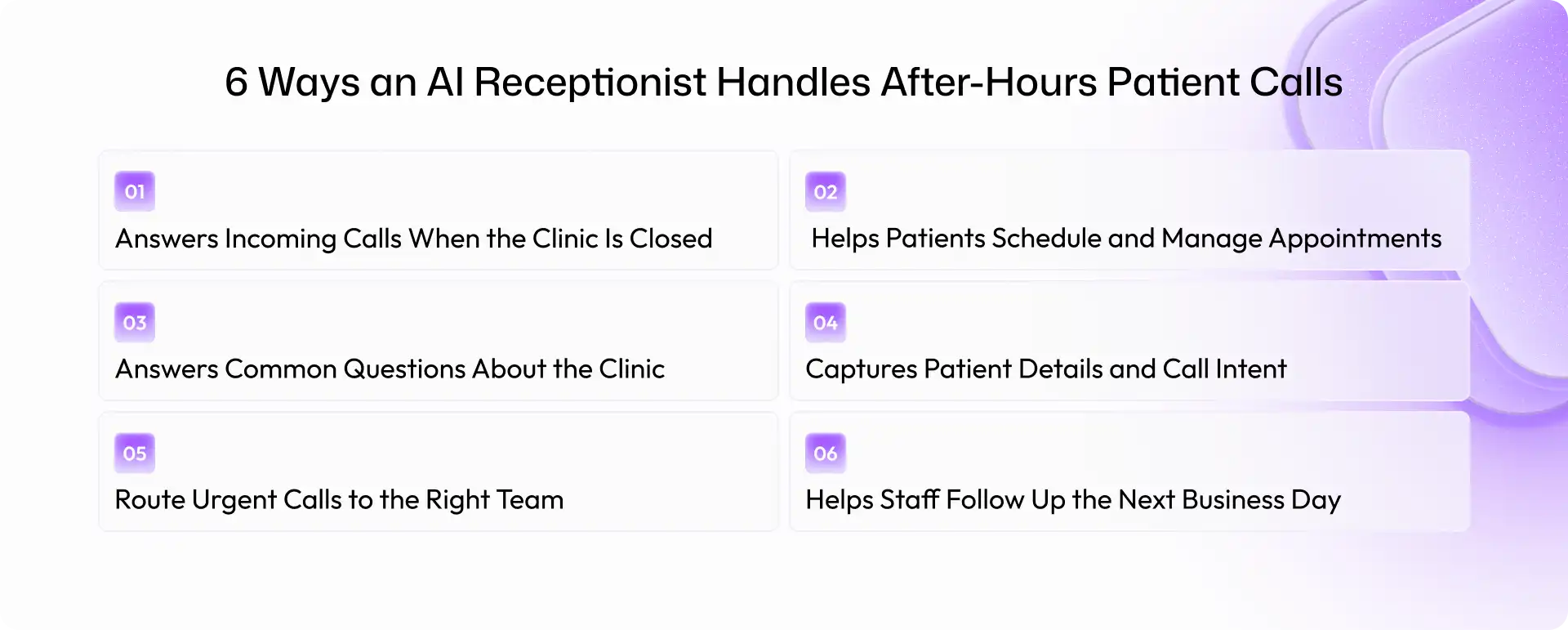
The real value of an AI receptionist becomes clearer when you look at what happens during an actual phone call. Rather than treating every caller the same way, it can follow different workflows based on the patient's request.
Here are six ways it can support a medical clinic after closing time.
1. Answers Incoming Calls When the Clinic Is Closed
The first job is straightforward: answer the phone. When a patient calls after business hours, the AI receptionist can greet them, identify the clinic, and ask how it can help. Patients don't have to wait for the next business day just to find out what options are available.
For example, a patient calling at 7:30 PM might want to know the clinic's opening hours or leave a request for the front desk. The AI can provide approved information or capture the request for follow-up.
Clinics can configure greetings and responses for evenings, weekends, and holidays. They can also define what happens when the system cannot understand a request or needs help from a staff member. This gives patients a clear next step instead of leaving them to guess whether anyone will return their call.
2. Helps Patients Schedule and Manage Appointments
Appointment requests are a common reason patients contact medical clinics outside regular hours.
An AI receptionist can collect a patient's preferred date, the type of appointment they need, and other relevant details. If the system integrates with the clinic's scheduling software, it may also check availability, book an appointment, or help with rescheduling.
Consider a patient who remembers at 8 PM that they need a follow-up visit. They call the clinic, explain what they need, and follow the AI's prompts. If direct booking is supported, the system can offer available slots according to the clinic's rules. Otherwise, it can record the request for staff to handle the next morning.
That distinction matters. Appointment booking should only be presented as an available feature when the system has the necessary integration and permissions.
Even when a request cannot be completed automatically, capturing the details accurately can save staff from starting the conversation from scratch.
3. Answers Common Questions About the Clinic
Not every call requires a receptionist to intervene. Many patients simply need information. An AI receptionist can answer common questions using information approved by the clinic, such as:
What time does the clinic open tomorrow?
Where is the office located?
Which insurance plans does the practice accept?
Should I bring any documents to my appointment?
How can I request a prescription refill?
The system should rely on current, clinic-approved information rather than guessing. If it cannot verify an answer, it should explain that a staff member will need to help.
This is particularly useful for clinics that receive the same questions repeatedly. Patients get immediate answers to routine queries, while the front desk has fewer basic requests to work through the next day.
4. Captures Patient Details and Call Intent
Sometimes, a patient's request needs to be handled later. The important thing is to capture enough information for the right person to follow up.
An AI receptionist can collect appropriate details, such as the caller's name, contact information, preferred callback time, and reason for calling. It can then create a structured message or call summary, depending on the system's capabilities.
For example, a new patient may call to ask about becoming a patient at the practice. The AI can capture their contact details and request for an appointment, then route that information to the front desk.
The clinic should decide in advance what information the system needs and what it should avoid collecting over the phone. Patient information must be handled according to applicable privacy and security requirements.
Clear records also make the next step easier for staff. Instead of listening to a long recording and trying to work out what happened, they can review the caller's request and take action.
5. Route Urgent Calls to the Right Team
This is one area where clinics need to be especially careful. Not every patient call is administrative. A caller may describe worsening symptoms, ask whether a medication reaction is serious, or report a problem that needs prompt medical attention.
An AI receptionist should not treat these situations like routine appointment requests. Clinics need clear escalation rules that distinguish ordinary inquiries from calls requiring clinical attention.
Depending on the practice's protocols, the system may direct callers to an on-call clinician, transfer the call to an appropriate number, or provide approved instructions for seeking emergency help. In the United States, callers facing a medical emergency should be directed to call 911 or seek appropriate emergency care, rather than waiting for a clinic callback.
The AI should not diagnose conditions, independently determine that a patient is safe, or promise that a clinician will respond within a certain time unless that process is established and reliable.
The goal is simple: routine calls can follow routine workflows, while potentially urgent situations receive the appropriate level of attention.
6. Helps Staff Follow Up the Next Business Day
An after-hours call doesn't always need an immediate resolution. Sometimes, it needs to reach the right person without getting lost.
An AI receptionist can organize call summaries, appointment requests, callback messages, and other tasks for staff to review when the clinic reopens.
Imagine the front desk receives 12 calls overnight. Some callers asked about office hours, a few requested appointments, and others need callbacks. Instead of working through an undifferentiated list of voicemails, staff may have organized records that show what each caller needs.
The team can prioritize follow-ups, contact patients, and update records as appropriate.
This doesn't eliminate administrative work. Staff still need to review requests, handle exceptions, and complete tasks that require human judgment. But better-organized information can make the morning workload more manageable.
Benefits of an AI Receptionist for Medical Clinics
An AI receptionist can make after-hours communication easier to manage, particularly for practices that receive frequent calls outside their regular opening times.
1. Fewer calls lost to voicemail
Patients can speak with an automated receptionist instead of hearing only a recorded message. Even when a request cannot be resolved immediately, the system can capture it for follow-up.
2. More convenient access for patients
People who work late, have busy family schedules, or cannot call during the day have another way to contact the clinic.
3. Less repetitive administrative work
Answering routine questions and collecting basic appointment details can take time away from other front-desk responsibilities. Automating suitable tasks can reduce some of that repetitive workload.
4. Better visibility into patient requests
Structured call summaries and organized follow-up tasks can help staff see what needs attention when they return.
5. More consistent call handling
A properly configured system can follow the same approved instructions across evenings, weekends, and holidays. Staff no longer need to rely entirely on voicemail to capture every routine request.
Of course, results depend on how the system is implemented. A poorly configured receptionist can frustrate callers just as much as an unanswered phone. Clinics should review call outcomes, check whether requests are being routed correctly, and give patients a clear way to reach a person when needed.
The aim isn't to automate every conversation. It's to make sure patients have a useful next step, even when the front desk is closed.
What Types of After-Hours Calls Can an AI Receptionist Handle?
An AI receptionist can support several common call types, depending on the clinic's workflows and the system's capabilities.
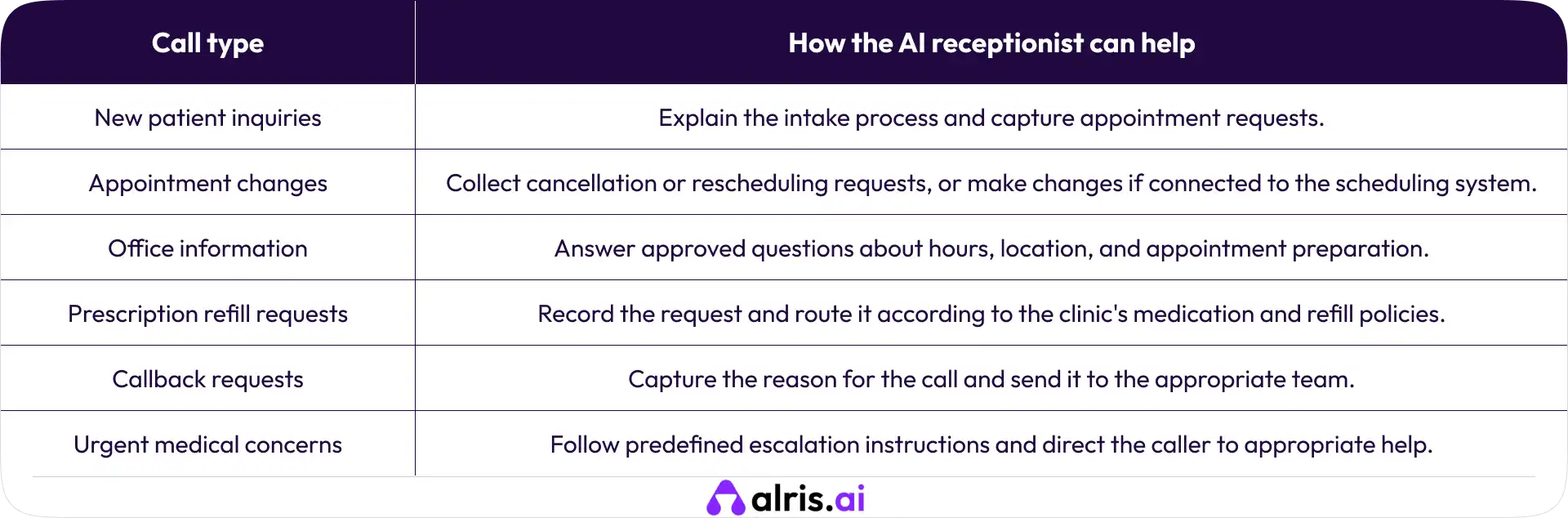
There is an important difference between collecting a request and completing it. An AI receptionist may record a prescription refill request, for instance, but that doesn't mean it can approve the refill. A clinician or authorized team member may still need to review it.
The same applies to clinical questions. The system can provide approved administrative information, but medical advice and decisions should remain within the appropriate clinical process.
Before introducing an AI receptionist, clinics should map their most common call types and decide which tasks can be automated, which require human review, and which need immediate escalation.
How to Choose the Right AI Receptionist for Your Clinic
Not every AI receptionist is designed for medical practices. Some focus on answering calls and recording messages, while others offer appointment scheduling, call routing, integrations, and follow-up workflows.
Before choosing an AI receptionist solution, consider these factors.
Natural conversations
The system should understand common requests, handle reasonable variations in how patients speak, and ask clarifying questions when needed. Patients shouldn't have to repeat themselves several times to get a simple answer.
Scheduling and practice-management integrations
If appointment booking is a priority, check whether the system connects with your existing scheduling software and can follow your availability, booking, and cancellation rules.
Custom call routing
The clinic should be able to define what happens to routine inquiries, clinical questions, callback requests, and potentially urgent calls.
Privacy and security
Review data handling, access controls, retention policies, and the vendor's ability to meet applicable HIPAA obligations.
Reporting and follow-up
Call summaries, request records, and reporting can help staff understand what happened overnight and identify tasks that remain unresolved.
Human support and fallback options
Patients should have a clear path to appropriate assistance when the AI cannot answer a question or handle a request.
It's also worth testing the system with realistic scenarios before going live. Try an appointment request, an unclear question, a prescription refill inquiry, and a call that requires escalation. These tests will reveal more than a polished product demonstration alone.
The right solution is the one that fits the clinic's actual workflows, not necessarily the one with the longest feature list.
How to Implement an AI Receptionist in a Medical Clinic
A successful rollout starts with a clear plan. There's no need to automate every phone interaction on day one.
Step 1: Identify common after-hours calls
Review existing call logs and voicemail messages. Look for recurring requests, such as appointment changes, office information, and callback needs.
Step 2: Define what the AI can handle
Decide which questions it can answer, which tasks it can complete, and which requests must go to a staff member. Use approved information for responses.
Step 3: Set escalation rules
Establish clear procedures for urgent concerns, clinical questions, and situations where the system cannot confidently understand a caller. Make sure the instructions are appropriate for your practice.
Step 4: Connect the necessary systems
If the clinic wants automated appointment booking or structured records, confirm that the required integrations are available and configured correctly.
Step 5: Test before launch
Run through realistic calls, including unexpected questions and escalation scenarios. Check whether the system records information accurately and follows the intended workflow.
Step 6: Review and improve
After launch, examine call outcomes, unresolved requests, patient feedback, and routing errors. Use those findings to refine the system.
Keep staff involved throughout the process. They understand the questions patients ask, the exceptions that arise, and the situations where human judgment is essential. Their feedback can make the difference between an AI receptionist that looks good in a demo and one that works well in everyday practice.
Frequently Asked Questions (FAQs)
1. Can an AI receptionist answer medical calls after hours?
Yes. An AI receptionist can answer calls after hours, respond to approved administrative questions, capture appointment requests, and route calls according to the clinic's rules. Clinical concerns and urgent situations need appropriate escalation procedures.
2. Can an AI receptionist book appointments when a clinic is closed?
Yes, if the solution supports appointment booking and is properly connected to the clinic's scheduling system. Otherwise, it can capture the patient's preferred time and send the request to staff for follow-up.
3. Can an AI receptionist handle urgent patient calls?
It can follow predefined escalation workflows, but it should not replace clinical judgment or emergency services. Clinics need clear instructions for directing callers with potentially urgent concerns to the appropriate source of help.
4. Is an AI receptionist suitable for small medical practices?
It can be useful for small practices that receive frequent after-hours calls or have limited front-desk coverage. Suitability depends on call volume, workflow requirements, integration options, and budget.
5. How is an AI receptionist different from voicemail?
Voicemail records a message for later review. An AI receptionist can interact with callers, understand their requests, provide approved information, and complete supported tasks. Both may still be useful, but an AI receptionist can offer more immediate assistance.
Shravan Rajpurohit
CEO & Co-Founder
Shravan Rajpurohit is the Co-Founder & CEO of The Intellify, a leading Custom Software Development company that empowers startups, product development teams, and Fortune 500 companies. With over 10 years of experience in marketing, sales, and customer success, Shravan has been driving digital innovation since 2018, leading a team of 50+ creative professionals. His mission is to bridge the gap between business ideas and reality through advanced tech solutions, aiming to make The Intellify a global leader. He focuses on delivering excellence, solving real-world problems, and pushing the limits of digital transformation.

Stay Updated
with AI Insights
Get the latest articles on AI, automation, and enterprise technology delivered to your inbox weekly.

500+ people have already subsribed!
No spam. Unsubscribe anytime.