
How to Automate Restaurant Phone Calls and Orders with AI in 2026



Summary: Learn how to automate restaurant phone calls and orders with AI. This guide explains how restaurant phone automation handles customer calls, takes orders, integrates with POS systems, manages peak-hour and after-hours demand, and helps restaurants capture more direct orders while reducing missed calls and third-party commissions.
Restaurant phone calls still play an important role in how US diners ask questions, place takeout orders, and connect with restaurants. But during lunch and dinner rushes, staff can only answer so many calls at once. Missed calls can mean missed orders, while manually handling every request adds more work for an already busy team.
Automating restaurant phone calls means using AI to answer incoming calls, handle customer questions, take orders, confirm details, and route requests to staff when human assistance is needed. With the right setup, restaurants can automate routine phone interactions without removing the human support customers need for more complex requests.
This guide explains how to automate restaurant phone calls and orders, what the process looks like, how AI phone ordering works with restaurant POS systems, which restaurant types can benefit, and where automation can directly improve revenue and operational efficiency.
Why US Restaurants Still Rely on Manual Phone Handling in 2026
The phone is still a primary revenue channel
Restaurant apps and online ordering have grown quickly, but the phone hasn't disappeared.
According to TouchBistro's US diner research, 29% of diners usually order directly over the phone, while 38% of Baby Boomers prefer calling in their orders rather than using apps.
Phone calls remain useful for more than simple takeout orders. Customers may call to ask about today's specials, check ingredients, make a reservation, place a large catering order, or explain a dietary requirement.
The problem is that most restaurants still handle these calls manually.
Why manual phone handling doesn't scale
During a busy service period, an employee answering the phone is also being pulled away from another task.
A server may be taking an order when the phone rings. A manager may be helping the kitchen. A host may already be checking in guests. The result can be:
Calls going unanswered
Customers waiting on hold
Orders being entered incorrectly
Staff repeating the same information
Voicemails that never become orders
Employees spend peak service time on routine calls
Adding another employee solely to answer the phone isn't always practical either. Call volume can change dramatically throughout the day. Restaurant phone automation addresses this by allowing routine calls to be handled without adding another person to every shift.
The third-party commission problem
There is another reason restaurants are looking more closely at direct ordering: marketplace commissions.
Third-party delivery platforms can take a significant percentage of each order, depending on the platform, plan, market, and agreement. The outline for this guide uses a 15-30% range as the planning example.
For example, if a restaurant processes $30,000 in third-party delivery orders in a month and pays a hypothetical 25% blended commission, that's $7,500 in monthly commissions.
Direct ordering doesn't carry the same marketplace commission structure. For restaurants that can move some customers from third-party platforms to direct channels, the margin difference can be meaningful.
What Does It Mean to Automate Restaurant Phone Calls and Orders?
Restaurant phone automation uses AI to handle incoming calls through a natural conversation rather than a traditional phone tree.
Instead of: “Press 1 for orders. Press 2 for reservations…”
An AI phone agent can understand what the customer is asking and respond accordingly.
For example, a caller might say: “I'd like two large pizzas, one without cheese, and can I add a side of wings?”
The system can identify the request, work through the available menu options, confirm the order, and, when properly integrated, send it into the restaurant's ordering workflow.
This is different from a basic IVR system, which primarily directs callers through predefined menu options.
What gets automated and what doesn't
A well-designed restaurant phone automation system can handle:
Incoming call answering
Common questions
Phone orders
Order modifications
Order confirmation
POS entry
SMS confirmations
After-hours calls
Multiple calls at the same time
Not every interaction should be automated. Complaints, unusual requests, complicated catering conversations, and situations requiring judgment can be transferred to a staff member.
The goal isn't to eliminate human interaction. It's to keep employees from spending valuable service time on tasks that software can handle reliably.
How to Automate Restaurant Phone Calls
A typical restaurant call automation workflow looks like this:
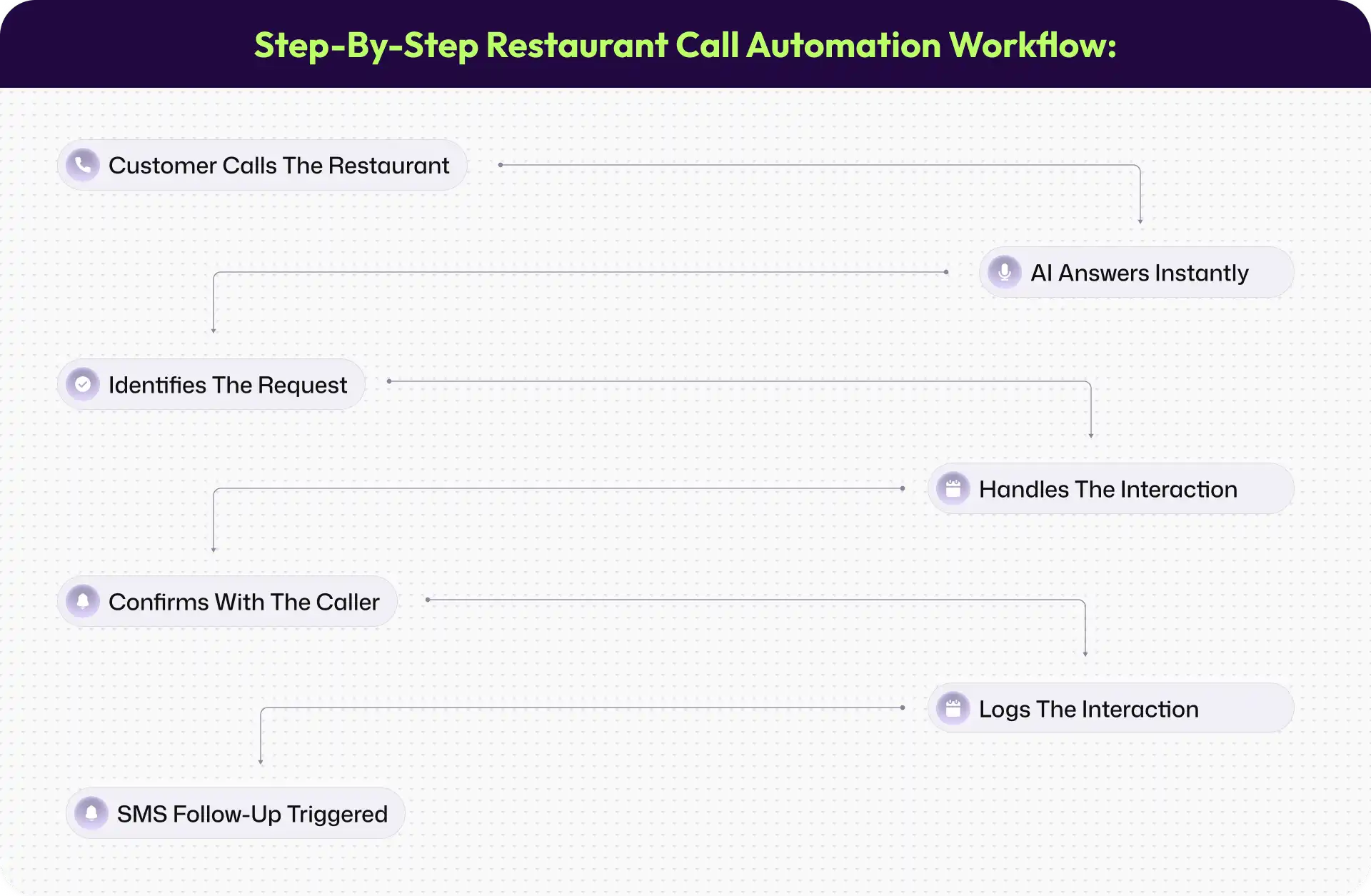
The customer doesn't need to know which internal system is handling each step. They simply get an answer without waiting for a busy employee.
Handling simultaneous calls during peak US service hours
One of the biggest advantages of restaurant phone automation is handling multiple calls at once.
During a Saturday dinner rush, several customers may call within the same few minutes. A human team can only answer so many simultaneously. An AI phone agent can handle concurrent calls without putting every caller into the same queue.
That can be especially useful for restaurants with high lunch and dinner call volumes, where missed calls can directly translate into missed orders.
After-hours call automation
Restaurant calls don't necessarily stop when the staff stops answering. Customers may call later in the evening to place an order for the following day, ask about operating hours, or inquire about catering.
Instead of sending every caller to voicemail, an AI system can answer common questions and, when configured, continue taking orders or capturing requests for staff follow-up.
This creates another ordering opportunity without requiring employees to stay on the phone after closing.
Call routing and escalation
Automation should also know when not to continue. If a customer has a complaint, requests something outside the configured workflow, or needs to speak with a person, the call can be escalated.
The important part is context. Staff should receive enough information about the conversation so the customer doesn't have to start from the beginning.
How to Automate Restaurant Phone Orders
Answering the phone is only the first step. To automate restaurant orders effectively, the system needs to understand the menu, modifications, order rules, and the restaurant's POS workflow.
1. Taking orders conversationally and accurately
AI phone ordering for restaurants should work through normal conversation rather than forcing customers through rigid prompts. It needs to understand:
Menu items
Sizes and quantities
Add-ons
Substitutions
Special instructions
Dietary requirements
Combos and upgrades
Before submitting the order, the AI should repeat the important details back to the customer. That confirmation step gives the caller an opportunity to catch a mistake before the order reaches the kitchen.
2. Getting orders into the POS automatically
POS integration is one of the most important parts of restaurant order automation. Without it, the AI may successfully take the call but leave employees with another manual task: entering the order into the POS.
With the right integration, the order can move directly into the restaurant's existing workflow.
Common US restaurant POS systems include Toast, Square, and Clover, although restaurants should always verify that their specific POS version and setup are supported. A live test order should be completed before going live with customers.
3. Handling order complexity - the US restaurant reality
Real restaurant orders aren't always simple. A customer might order several meals, change individual ingredients, add sides, request substitutions, and ask about allergens in the same conversation.
The system therefore needs to understand the restaurant's actual menu logic rather than just read a static menu.
This is particularly important for pizza, fast-casual, takeout-heavy restaurants, and businesses with extensive combinations and modifications.
4. The commission avoidance calculation
The financial case is straightforward: Direct order volume × applicable third-party commission rate = potential commission savings
For example, if a restaurant has $30,000 in monthly third-party delivery volume and uses a hypothetical 25% blended commission rate, commissions equal $7,500 per month.
If the restaurant moves 20% of that volume to direct ordering: $30,000 × 20% × 25% = $1,500/month
That's $18,000 per year in potential commission savings, before considering any other costs associated with the direct-ordering channel.
Actual savings depend on the restaurant's contracts, order mix, platform fees, and operating costs.
Automating Restaurant Phone Calls and Orders Across Restaurant Types
Quick Service and Fast Casual
Quick-service and fast-casual restaurants often deal with high call volumes during lunch and dinner.
For these businesses, speed and accuracy matter most. Restaurant phone automation can handle routine orders simultaneously while staff concentrate on preparing and serving food.
Pizza and High-Volume Takeout
Pizza restaurants are a natural use case for AI phone ordering because orders often involve sizes, toppings, combinations, deals, and add-ons.
The system needs to understand these relationships rather than simply capture a list of words.
For a busy Friday night, handling multiple calls without placing customers on hold can make a noticeable operational difference.
Full-Service Restaurants
Full-service restaurants may receive fewer basic takeout calls but more detailed requests. Calls might involve reservations, catering, large groups, dietary requirements, or special occasions.
Here, automation can handle routine questions while escalating conversations that need personal attention.
Casual Dining Chains
For chains, consistency becomes another advantage. A centralized restaurant phone automation system can help multiple locations follow consistent call-handling rules while still using each restaurant's menu, hours, and operational details.
Ghost Kitchens and Delivery-First Concepts
Ghost kitchens and delivery-first restaurants depend heavily on efficient ordering.
Direct phone ordering gives them another way to capture customers without sending every order through a third-party marketplace.
For these businesses, even a small increase in direct order volume can have a meaningful impact on margins.
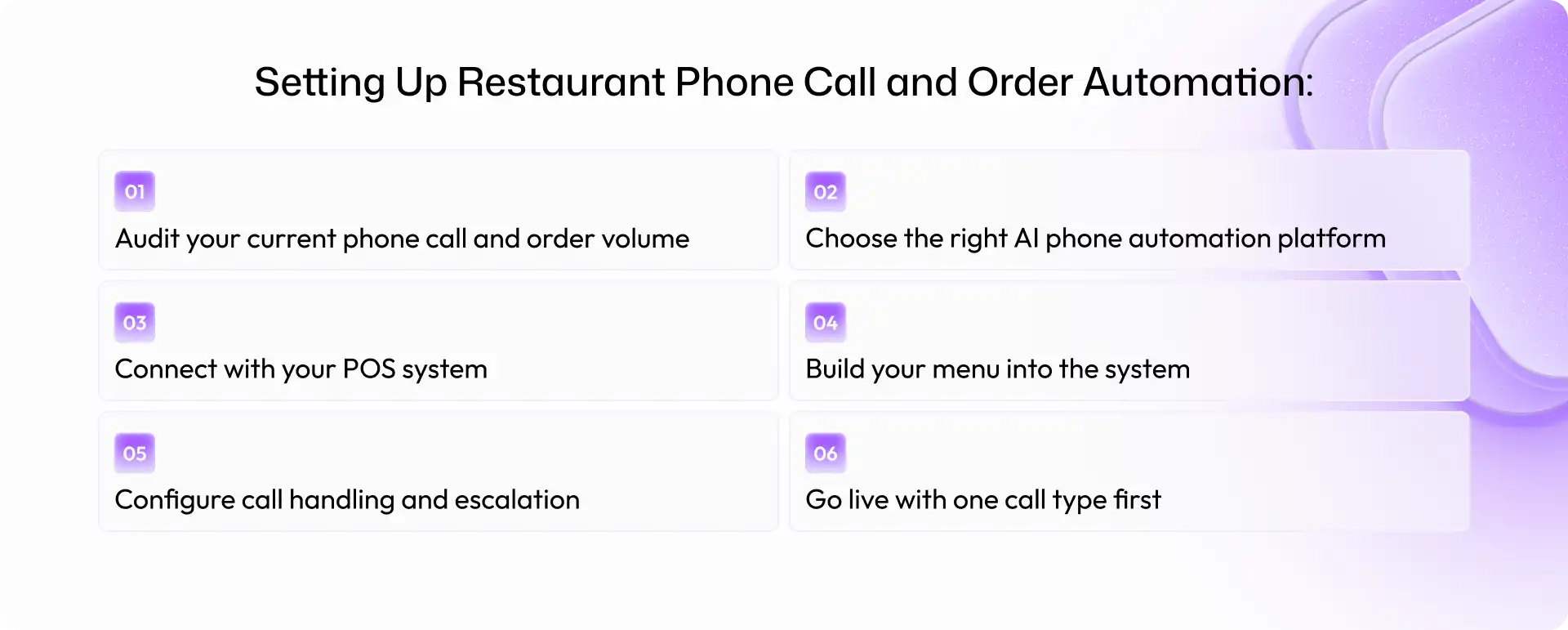
Setting Up Restaurant Phone Call and Order Automation: Step-by-Step
Step 1: Audit your current phone call and order volume
Start with your existing data. Find out:
How many calls do you receive each day
When call volume peaks
How many calls go unanswered
How many calls are orders
How many are general questions or other requests
This gives you a baseline for measuring the impact of automation later.
Step 2: Choose the right AI phone automation platform
Not every voice AI platform is designed for restaurant operations. Restaurant ordering has its own requirements. When evaluating a platform, look for:
POS integration
Natural conversation quality
Order accuracy
After-hours support
Simultaneous call handling
Menu and modification support
Human escalation
Don't choose a platform simply because it can answer a phone call. Restaurant ordering has more operational requirements than basic voice answering.
Step 3: Connect with your POS system
Confirm that the platform works with your specific POS before committing. The goal is to move the order from the conversation into the restaurant's workflow without unnecessary manual entry. Run test orders from the phone call through to the kitchen before launch.
Step 4: Build your menu into the system
Your AI needs more than a list of menu items. It needs the logic behind the menu. That includes:
Menu items
Sizes
Modifications
Substitutions
Add-ons
Specials
Seasonal items
Dietary information
Menu maintenance shouldn't stop after launch. If an item changes, the phone system needs to reflect that change.
Step 5: Configure call handling and escalation
Define exactly what the AI should handle and when it should transfer a caller. Also configure:
Greeting
Call flow
After-hours behavior
Human escalation
SMS confirmation
Order confirmation
Step 6: Go live with one call type first
Don't automate everything on day one. Start with a straightforward, high-volume use case such as basic phone orders.
Monitor the results, review order accuracy, identify problems, and then expand into more complex requests and after-hours ordering.
A straightforward single-location setup can often be configured within one to two weeks, although the actual timeline depends on menu complexity, integrations, and testing requirements.
The Direct Revenue Case for Automating Restaurant Phone Orders
The financial case usually comes down to three areas.
Recovering missed calls during peak hours
If a restaurant misses five calls during a service and the average direct takeout order is approximately $38, that's potentially $190 in missed order value for that service.
The basic calculation is: Missed calls × average order value × services per week × 52
Not every missed call would have become an order, of course. The point is to establish how much potential revenue is being lost and measure whether automation recovers some of it.
Protecting margin from third-party commissions
Moving a portion of third-party orders to direct ordering can reduce marketplace commission exposure.
Using the earlier example, shifting 20% of $30,000 in monthly third-party volume at a hypothetical 25% commission represents $1,500 in potential monthly commission savings.
After-hours order capture
After-hours automation creates another potential revenue channel.
The calculation is simple: After-hours calls × conversion rate × average order value
For restaurants that accept next-day pickup, catering inquiries, or other orders outside normal answering hours, these calls don't necessarily need to disappear into voicemail.
What to Look for in a Restaurant Phone Automation Platform
Before choosing a restaurant phone answering service or AI phone agent for restaurants, evaluate the platform against your actual operation.
1. POS integration: Orders should move into your POS workflow without unnecessary manual re-entry.
2. Natural conversation: Test the system with real customer questions and realistic orders.
3. Order accuracy: Pay particular attention to modifications, substitutions, quantities, and multi-item orders.
4. After-hours capability: Find out whether the system can actually take orders after hours or simply record messages.
5. Simultaneous call handling: Ask how many calls can be handled during peak periods.
6. SMS confirmation: Automated confirmation can give customers a written record of their order.
7. Menu updates: Your team should be able to update menu items, specials, and availability without unnecessary delays.
8. Call analytics: Look beyond call volume. Track answered calls, order conversion, missed calls, and other useful operational metrics.
9. Bilingual support: For US restaurants serving diverse customer bases, English and Spanish support can be an important consideration.
Common Mistakes US Restaurants Make When Automating Phone Orders
Choosing a platform without POS integration
If staff still have to manually enter every order, much of the operational benefit is lost.
Not testing order accuracy
An AI system that misunderstands modifications can create kitchen mistakes and unhappy customers. Test real and difficult orders before launch.
Ignoring after-hours
If you're only using automation during business hours, you're leaving one of its potential use cases underused.
Treating automation as a replacement for all customer interaction
Some situations need a person. Build clear escalation paths for complaints, complex catering conversations, and unusual requests.
Not updating the menu
An outdated AI menu can be worse than no automation. Customers should receive accurate information about availability, prices, and options.
Measuring call volume instead of conversion
Answering more calls is useful, but the more important question is: How many calls became completed orders or useful customer interactions?
Conclusion
US restaurants still receive meaningful business through phone calls, but manually handling every call becomes difficult during peak service hours.
Automating restaurant phone calls can help restaurants answer more calls, handle routine questions, take orders, manage after-hours inquiries, and route complex requests to staff. When connected to the POS, AI phone ordering can also reduce manual order entry and create a more direct ordering workflow.
The best approach isn't to automate everything at once. Start with a high-volume use case, connect the POS, test order accuracy, monitor the results, and expand from there. For restaurants, the opportunity is straightforward: fewer missed calls, more direct orders, and less time spent on repetitive phone work.
If your restaurant is missing calls, spending too much time taking phone orders manually, or paying commissions on orders that could come directly to you, it may be worth looking at what automation can handle.
Alris AI helps restaurants automate phone calls and orders across voice and SMS, with POS connectivity built into the workflow.
Frequently Asked Questions (FAQs)
1. What does it mean to automate restaurant phone calls?
Automating restaurant phone calls means using AI software to answer incoming calls, understand what the caller needs, and handle the interaction. It can answer questions, take orders, or route the call to a staff member when human assistance is needed.
2. How does AI take restaurant phone orders accurately?
The AI captures the order conversationally, handles configured modifications and requirements, confirms the details with the customer, and sends the order into the POS when an integration is available. Accuracy depends heavily on the correct menu and modification configuration.
3. Does restaurant phone order automation work with my POS?
Many restaurant phone automation platforms support common US POS systems such as Toast, Square, and Clover. Always confirm compatibility with your specific POS and test a live order before launch.
4. How does automating phone orders help avoid third-party commissions?
Direct ordering can reduce reliance on third-party marketplaces and their associated marketplace commissions. The actual savings depend on the platform, plan, market, and the restaurant's agreement, so restaurants should calculate savings using their actual rates.
5. Can AI handle complex restaurant phone orders with modifications?
Yes, when the system is properly configured. It can be set up to understand substitutions, additions, size variations, and other menu-specific modifications. Restaurants should test their most complicated order scenarios before going live.
6. How does restaurant call automation handle after-hours orders?
An AI phone system can continue answering calls after the restaurant stops taking calls manually. Depending on the configuration, it can answer questions, take orders for later pickup, or capture catering inquiries for follow-up.
7. Will customers know they're talking to AI when they call?
AI phone systems are designed to have natural conversations. Restaurants should also consider applicable disclosure requirements, which can vary by US state.
8. How much can a restaurant save by automating phone orders?
Savings depend on two main factors: recovered orders from previously missed calls and reduced third-party commission exposure. The exact amount depends on call volume, conversion rate, average order value, third-party order volume, and applicable commission rates.
9. How long does it take to set up restaurant phone automation?
A straightforward single-location setup with a supported POS integration can often be launched within one to two weeks. More complex menus, integrations, and testing requirements can extend the timeline.
10. Is phone call automation suitable for small independent US restaurants?
Yes. Smaller restaurants can benefit from automating routine calls, particularly when staff are already stretched during busy service periods. The business case depends on the restaurant's call volume, order value, staffing costs, and potential direct-order revenue.
Sources & References:
1. TouchBistro - 2024 Diner Trends Report
2. DoorDash - Merchant Fees and Pricing
3. Uber Eats - US Merchant Pricing
4. Toast - Restaurant POS and Online Ordering
5. Clover - Online Ordering and POS Integration
6. Clover - Grubhub Integration
“Direct orders can help restaurants avoid the marketplace commissions associated with third-party delivery platforms. Published rates vary by platform, plan, and market, so restaurants should compare their actual agreements when calculating potential savings.”
Shravan Rajpurohit
CEO & Co-Founder
Shravan Rajpurohit is the Co-Founder & CEO of The Intellify, a leading Custom Software Development company that empowers startups, product development teams, and Fortune 500 companies. With over 10 years of experience in marketing, sales, and customer success, Shravan has been driving digital innovation since 2018, leading a team of 50+ creative professionals. His mission is to bridge the gap between business ideas and reality through advanced tech solutions, aiming to make The Intellify a global leader. He focuses on delivering excellence, solving real-world problems, and pushing the limits of digital transformation.

Stay Updated
with AI Insights
Get the latest articles on AI, automation, and enterprise technology delivered to your inbox weekly.

500+ people have already subsribed!
No spam. Unsubscribe anytime.