
How to Automate Restaurant Reservation Booking 24/7 With AI



It's 10:15 pm on a Thursday. The kitchen is cleaning down, the last table is finishing dessert, and someone just called to book for Saturday night. Nobody picked up. The call went to voicemail. The customer didn't leave a message. That booking didn't happen. And there's a decent chance that customer called the restaurant down the street next.
This plays out in restaurants every single day, not just after hours, but during service when the phone rings and every pair of hands is already occupied. Reservation requests arrive at inconvenient times, get handled in a rush, or simply don't get handled at all.
Manual reservation management works fine at low volume. But as a restaurant gets busier, the cracks appear: missed calls, booking errors, no-shows that could have been avoided with a reminder, cancelled tables that sit empty because nobody updated the availability in time.
AI automation fixes this. Not in a complicated, rip-everything-out way but by handling the parts of the reservation process that don't need a human in the loop. Every call gets answered. Every booking gets confirmed. Every reminder goes out. Every cancellation gets filled.
This guide covers how restaurant reservation automation actually works, what to look for in a platform, and how to implement it without creating more problems than it solves.
The Problem With Manual Restaurant Reservation Booking
Calls and enquiries outside business hours go unanswered
Here's something most restaurant owners know but rarely calculate properly: a significant share of reservation requests arrive when the restaurant is closed or winding down. People plan dinner on Sunday evenings. They call during their lunch break on a Tuesday. They text after the kids are in bed.
If the restaurant isn't available to respond, the booking doesn't happen. Voicemail helps occasionally, but most people don't leave messages anymore, and even when they do, callback takes time. By then, they've often made other plans.
The after-hours gap is a real revenue leak. It's just quiet enough that it doesn't feel urgent until someone actually adds it up.
Peak hour bottlenecks
The worst time to field a reservation call is during a busy Friday dinner service. The host is seating a party of six. The server is mid-order. The phone rings. Nobody can get to it without abandoning something else.
So it rings out. Or someone answers in a rush, takes a name and time without checking properly, and creates a double booking that becomes a problem at 7:30 pm Saturday when two groups show up for the same table.
The floor and the phone compete for the same limited attention during the exact hours when reservation demand is highest. Manual management makes this worse the busier the restaurant gets.
No-shows and last-minute cancellations
A table of four who don't show up is a meaningful hole in a night's revenue. And no-shows happen, in large part, because nobody reminded them.
Manual reminder systems a staff member calling through the booking list the day before sound manageable until service gets busy. Then reminders get skipped. Then a Thursday night has three empty tables that were booked a week ago.
Last-minute cancellations cause a similar problem. The table becomes available, but if it's not immediately communicated to whoever's on the waitlist, it stays empty for the night.
Managing reservations across multiple channels
Phone calls. Walk-ins. Online booking forms. Instagram DMs. Sometimes a note left on the table by a regular. Reservations arrive from everywhere, and keeping track of all of them manually is genuinely hard.
Information gets siloed. A booking taken over the phone doesn't make it into the online system. A cancellation communicated by text doesn't get reflected in the physical diary. Errors accumulate. Double bookings happen. Staff spend time reconciling records that should never have been separate in the first place.
What Is Restaurant Reservation Automation?
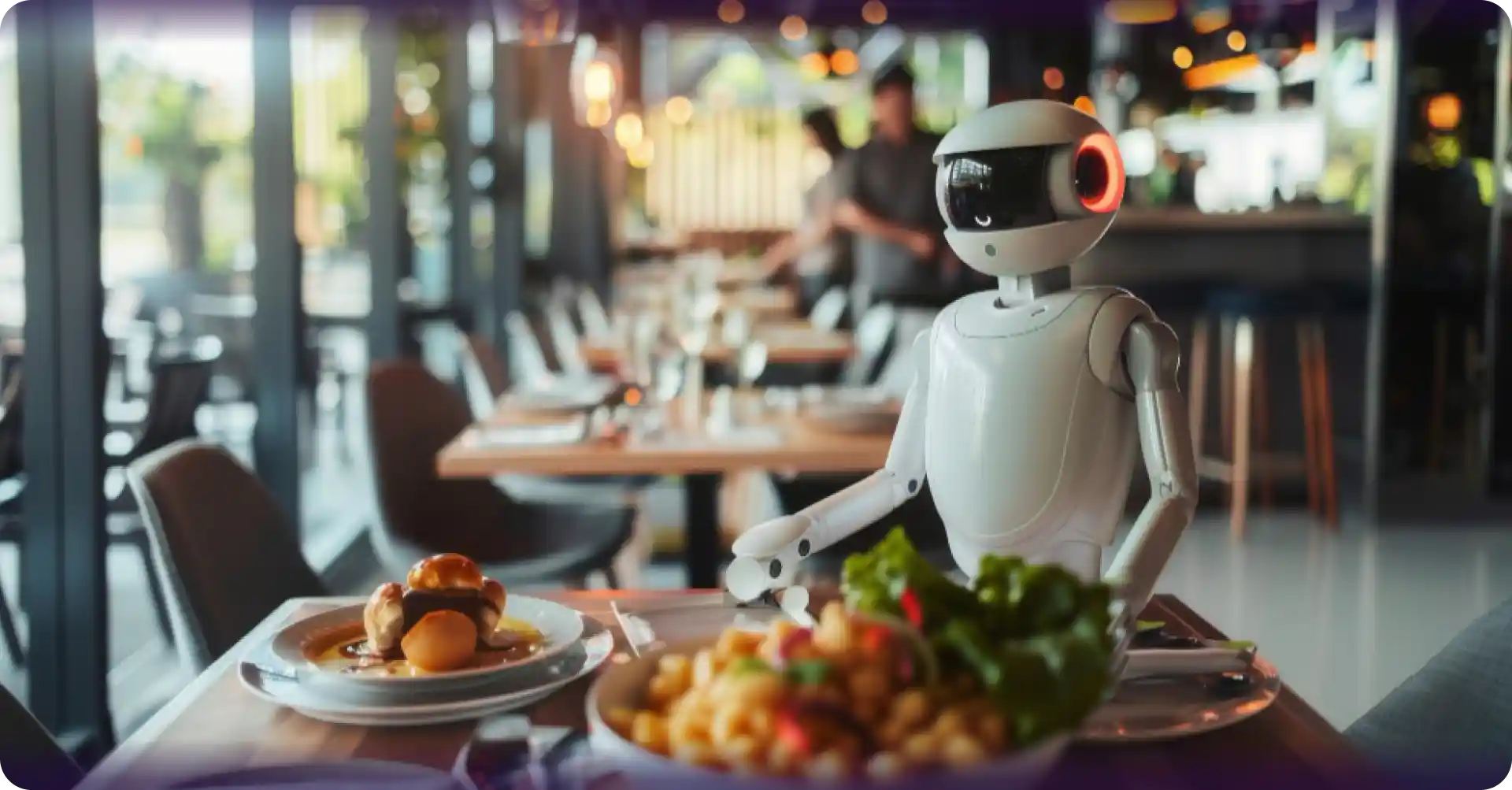
Restaurant reservation automation uses AI to manage bookings across phone calls, SMS, email, and online channels without requiring staff to manually answer every request. An AI reservation system checks real-time availability, confirms bookings instantly, sends reminders, manages cancellations, updates waitlists, and integrates with restaurant calendars and POS systems.
What automated reservation booking handles
A properly configured restaurant reservation automation system covers:
Answer every booking request 24/7
Reduce missed calls and lost reservations
Lower no-show rates with automated reminders
Fill cancelled tables faster using smart waitlists
Free front-of-house staff during peak service
Improve guest experience with instant confirmations
Modern AI platforms like Alris AI also handle multiple reservation requests simultaneously, ensuring restaurants never lose bookings because the phone wasn't answered.
How AI Automates Restaurant Reservation Booking 24/7
The end-to-end workflow is cleaner than most restaurant owners expect:
Customer Calls or Contacts the Restaurant - phone, SMS, or online
↓
AI Answers Instantly - no hold time, no voicemail, no "we're currently closed"
↓
Checks Real-Time Availability - pulls live data from the reservation system
↓
Confirms the Booking During the Interaction - date, time, party size, any special notes
↓
SMS and Email Confirmation Sent Automatically - within seconds of the call ending
↓
Reminder Sent 24-48 Hours Before - with a simple confirm, reschedule, or cancel option
↓
Customer Responds - confirmation logged, or change handled automatically
↓
Table Released for Rebooking if Cancelled - immediately available for the next enquiry
↓
Post-Visit Follow-Up Triggered - feedback request or return visit prompt sent automatically
How it handles simultaneous requests during peak hours
Five reservation calls arriving during Saturday service get handled simultaneously. Each caller gets an immediate response. Nobody waits, nobody gets sent to voicemail, and no staff member has to choose between answering the phone and attending to a table.
How it manages waitlists
When a preferred time is fully booked, the system adds the caller to a waitlist and contacts them automatically if a cancellation opens up without anyone monitoring the list manually.
How it escalates when needed
Complex requests a large group with specific seating requirements, an unusual dietary situation, or something the system hasn't been configured to handle get flagged and transferred to a staff member with context already captured.
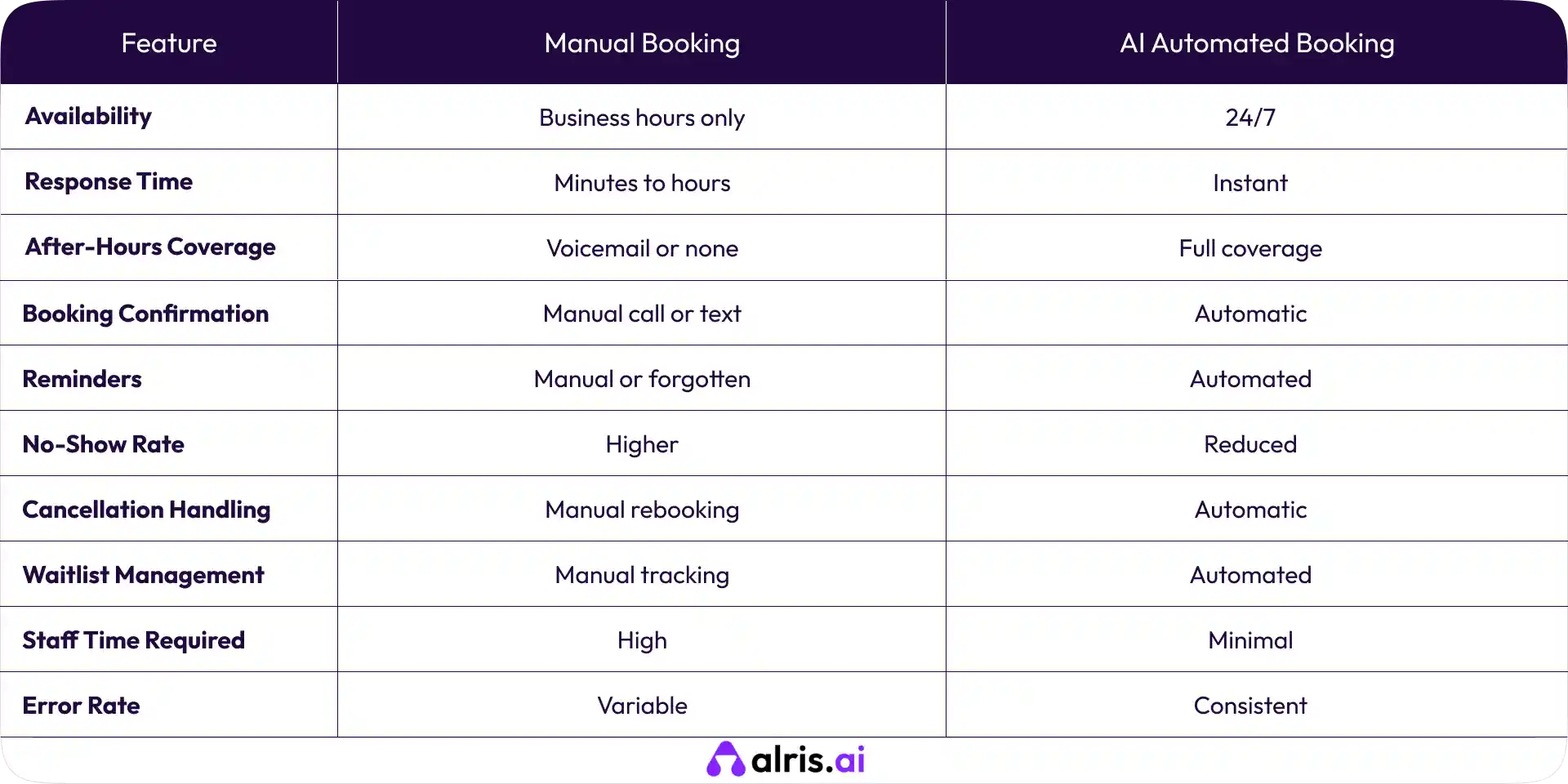
Manual Reservation Booking vs Automated Reservation Booking
Key Benefits of Automating Restaurant Reservation Booking
Never Miss a Reservation Request
Every booking enquiry gets answered immediately: phone calls at 11 pm, SMS requests on Sunday morning, online forms submitted during the lunch rush. After-hours availability is where the most immediate revenue recovery happens for most restaurants.
Reduce No-Shows With Automated Reminders
A reminder message the day before with a simple option to confirm, reschedule, or cancel consistently moves the needle on no-show rates. When customers can respond directly to the reminder rather than having to make a separate call, they're far more likely to actually do it.
Cancellations from reminders are actually good news. An early cancellation means the table can be filled. An empty table on the night means it can't.
Free Up Front-of-House Staff During Service
Staff stops getting pulled off the floor to answer reservation calls. The host manages the dining room. The phone is covered. Both things happen simultaneously without competing for the same person's attention.
Handle Peak Hour Demand Without Extra Staff
Ten reservation requests during a Friday service get handled without a single one going to voicemail. The quality of each interaction stays consistent regardless of how busy the floor is.
Consistent Booking Experience Every Time
Every caller gets the same process: same confirmation, same reminder, same follow-up. No errors from a rushed booking during service. No forgotten confirmations on a busy night. The experience is the same at 11 am on a quiet Tuesday as it is at 7:30 pm on a packed Saturday.
Fill Cancellations Faster With Smart Waitlists
When a table cancels, it goes back into available inventory immediately. Waitlisted customers get notified automatically. The restaurant recovers revenue from cancellations that would otherwise result in an empty table.
How to Automate Restaurant Reservations: Step-by-Step
Step 1: Map your current reservation workflow
Before touching any technology, understand what's actually happening now. Where do reservation requests currently arrive? Phone, walk-in, online, social? Where do errors happen? Where do bookings get lost? What does your current confirmation and reminder process look like, and how consistently does it actually run?
This map becomes the foundation for how the automation gets configured.
Step 2: Choose the right AI reservation automation platform
The platform needs to handle voice calls, not just online bookings. A lot of solutions in this space are website-only, which means every phone reservation still falls on the team.
Key questions to ask before committing: Does it integrate directly with your calendar and POS system? Does it send automatic confirmations and reminders via SMS? Can it handle after-hours calls with the same capability as business hours? What does the setup process actually involve?
Step 3: Connect with your existing calendar and POS system
Integration isn't optional. If reservations made through the AI system don't sync directly with your actual booking calendar, the team is still manually reconciling records, which defeats the purpose.
Confirm integration with your specific systems before signing anything. "We integrate with reservation platforms" and "we have a direct integration with the platform you use" are meaningfully different.
Step 4: Configure conversation flows and booking logic
Set up availability windows, party size limits, and how the system handles special requests: birthdays, dietary requirements, preferred seating. Configure confirmation and reminder message templates. Set clear escalation paths for anything the system shouldn't handle automatically.
This is also where you configure the waitlist logic: what happens when a preferred time is full, how the customer gets notified if a slot opens, and how far in advance reminders go out.
Step 5: Test with real reservation scenarios
Run through every scenario your customers are likely to encounter, including the awkward ones. A caller who wants to book for 15 people on New Year's Eve. A regular who asks for "the usual table." Someone calling at 11:30 pm to book for tomorrow night. A customer who books and then calls back twice to change the time.
If the system handles these well, you're ready. If it doesn't, better to know now than after it goes live.
Step 6: Go live and monitor performance
Launch with monitoring in place. Review call recordings and booking data in the first two weeks. Look for patterns: calls where the AI struggled, requests that went to voicemail when they shouldn't have, bookings that didn't sync correctly with the calendar.
Fix what needs fixing early. The system improves significantly with attention in the first month.
What to Look for in an AI Restaurant Reservation System
1. Real-time availability
Bookings confirmed during the interaction, not queued for processing later. If the system can't check live availability, it can't make accurate commitments to callers.
2. Voice and SMS capability
Any platform that only handles online requests is missing the largest share of reservation enquiries. AI voice calls still dominate for restaurants, particularly for same-day and next-day bookings.
3. Calendar and POS integration
Reservations need to flow directly into the systems the team actually uses. No manual transfer, no separate diary to maintain alongside the main system.
4. Automated confirmations and reminders
Sent without anyone on the team initiating them. This is non-negotiable for reducing no-shows.
5. Waitlist management
Automatic notification when a cancelled slot becomes available. Manual waitlist tracking is one of the first things that gets dropped when service gets busy.
6. Multilingual support
Depending on the customer base, this may matter more than expected. Worth confirming before committing to a platform.
7. Analytics and reporting
Booking volumes, no-show rates, peak hour patterns, cancellation rates. You need this data to know whether the system is working and where to improve it.
8. Easy updates
Seasonal hours, special event availability, menu-related booking notes. Changes should take effect immediately without requiring a support ticket.
Final Thought
Restaurants lose reservation revenue in quiet, incremental ways: a missed call here, a forgotten reminder there, a cancelled table that never got offered to the waitlist. None of it feels catastrophic in the moment. It adds up over a month.
Restaurant reservation automation closes these gaps. Not by replacing the hospitality that makes a restaurant worth booking, but by handling the operational layer that makes sure the booking actually happens and that the customer shows up when they said they would.
The restaurants getting the most out of this aren't just automating the booking step. They're connecting it with confirmations, reminders, waitlist management, and post-visit follow-ups so the whole cycle runs without anyone on the team managing it manually. That's the difference between a reservation system and a reservation workflow.
Frequently Asked Questions (FAQs)
1. What is restaurant reservation automation?
Restaurant reservation automation is the use of software, typically AI-powered, to handle booking requests, confirmations, reminders, and cancellations automatically, without staff managing each step manually. It covers voice calls, SMS, and online requests from one connected system.
2. Can AI take restaurant reservations over the phone?
Yes. AI voice systems answer reservation calls, understand the request, check live availability, and confirm the booking conversationally, available 24/7 and handling multiple calls at the same time.
3. How does reservation automation reduce no-shows?
By sending automated reminders 24-48 hours before the reservation with a simple option for customers to confirm, reschedule, or cancel. When a customer cancels, the table gets released for rebooking immediately rather than sitting empty on the night.
4. Does restaurant reservation automation integrate with POS systems?
Most modern platforms integrate with common POS and reservation management systems. Integration should be confirmed before selecting a platform; without it, reservations still require manual entry into the main system.
5. Can the system handle large group bookings and special requests?
Yes, when properly configured. Party size limits, special occasion notes, dietary requirements, and seating preferences can all be captured during the booking interaction and logged automatically.
6. What happens when the AI can't handle a reservation request?
Complex or unusual requests get escalated to a staff member with full context from the conversation passed along. The customer doesn't need to repeat themselves, and the staff member has what they need to complete the booking.
7. Is reservation automation suitable for small restaurants?
Yes. Small restaurants often benefit most because they're least able to dedicate staff to managing reservations and most likely to miss calls during service. The cost of the system is typically offset quickly by recovered bookings.
8. Can the system manage reservations across multiple locations?
Yes. Multi-location groups can manage reservations across all sites from one platform, with per-location availability, hours, and capacity configured separately and reporting consolidated centrally.
Shravan Rajpurohit
CEO & Co-Founder
Shravan Rajpurohit is the Co-Founder & CEO of The Intellify, a leading Custom Software Development company that empowers startups, product development teams, and Fortune 500 companies. With over 10 years of experience in marketing, sales, and customer success, Shravan has been driving digital innovation since 2018, leading a team of 50+ creative professionals. His mission is to bridge the gap between business ideas and reality through advanced tech solutions, aiming to make The Intellify a global leader. He focuses on delivering excellence, solving real-world problems, and pushing the limits of digital transformation.

Stay Updated
with AI Insights
Get the latest articles on AI, automation, and enterprise technology delivered to your inbox weekly.

500+ people have already subsribed!
No spam. Unsubscribe anytime.