
How Automated Patient Communication Reduces Staff Workload



Patient communication is part of running a healthcare practice. But managing every call, reminder, follow-up, scheduling request, and routine question manually can quietly become one of the biggest drains on staff time.
A front-desk employee may start the morning with a simple to-do list. Then the phone starts ringing. One patient wants to move an appointment. Another needs directions. Someone calls to confirm tomorrow's visit. A few patients still need follow-up messages.
None of these tasks seem huge on their own. Together, though, they can eat up hours.
This is where automated patient communication can help. Instead of asking staff to manually manage every routine interaction, practices can automate repetitive communication while keeping people involved when a situation actually needs human judgment.
The goal isn't to remove the human side of healthcare. It's to give staff fewer repetitive tasks to deal with.
Why Patient Communication Creates So Much Work for Staff
Patient communication sounds straightforward until you look at everything involved. Staff may be answering calls, confirming appointments, responding to texts, sending reminders, handling cancellations, collecting information, and following up with patients who haven't responded. And these tasks don't always happen at convenient times.
Phone Calls Interrupt the Workday
A clinic's front desk can be busy even when there isn't a line of patients waiting. The phone might ring every few minutes with questions such as:
"Can I move my appointment?"
"What time do you close?"
"Do you have anything available next week?"
"Where are you located?
"Can I confirm my appointment?"
"What do I need to bring?"
Most of these questions are routine. But someone still has to answer them.
When several calls come in at once, staff have to decide which task gets attention first. A patient standing at the desk may have to wait while an employee answers the phone.
That constant switching can be frustrating, and it makes the workday harder than it needs to be.
Follow-Ups Are Easy to Miss
Follow-up communication is another problem. A practice may need to remind patients about appointments, contact someone after a visit, follow up on an outstanding request, or remind a patient to schedule the next appointment.
These tasks often depend on someone remembering to do them at the right time. It's not necessarily a staffing problem. It's a workflow problem. When staff is already handling dozens of other things, a follow-up can slip through the cracks.
Small Tasks Add Up
One reminder message might take a minute. One scheduling call might take five minutes. One missed-call callback might take another few minutes. Now multiply those tasks across dozens of patients every day.
That is where the workload starts becoming significant. Automating some of these small tasks can give staff something valuable back: uninterrupted time.
What Is Automated Patient Communication?
Automated patient communication is the use of software, workflows, or AI to manage routine interactions with patients without requiring staff to manually handle each one.
Depending on the system, this can include:
Appointment reminders
Confirmations
Scheduling requests
Rescheduling and cancellations
Follow-up messages
Routine questions
Missed-call responses
Patient information collection
After-hours communication
Basic automation usually follows predefined rules. For example, a system may automatically send a reminder 24 hours before an appointment.
AI-powered receptionist can go a step further. It can understand what a patient is asking and determine what action may be needed. That's an important difference.
The point isn't simply to send more messages. It's to reduce the amount of manual work required to keep communication moving.
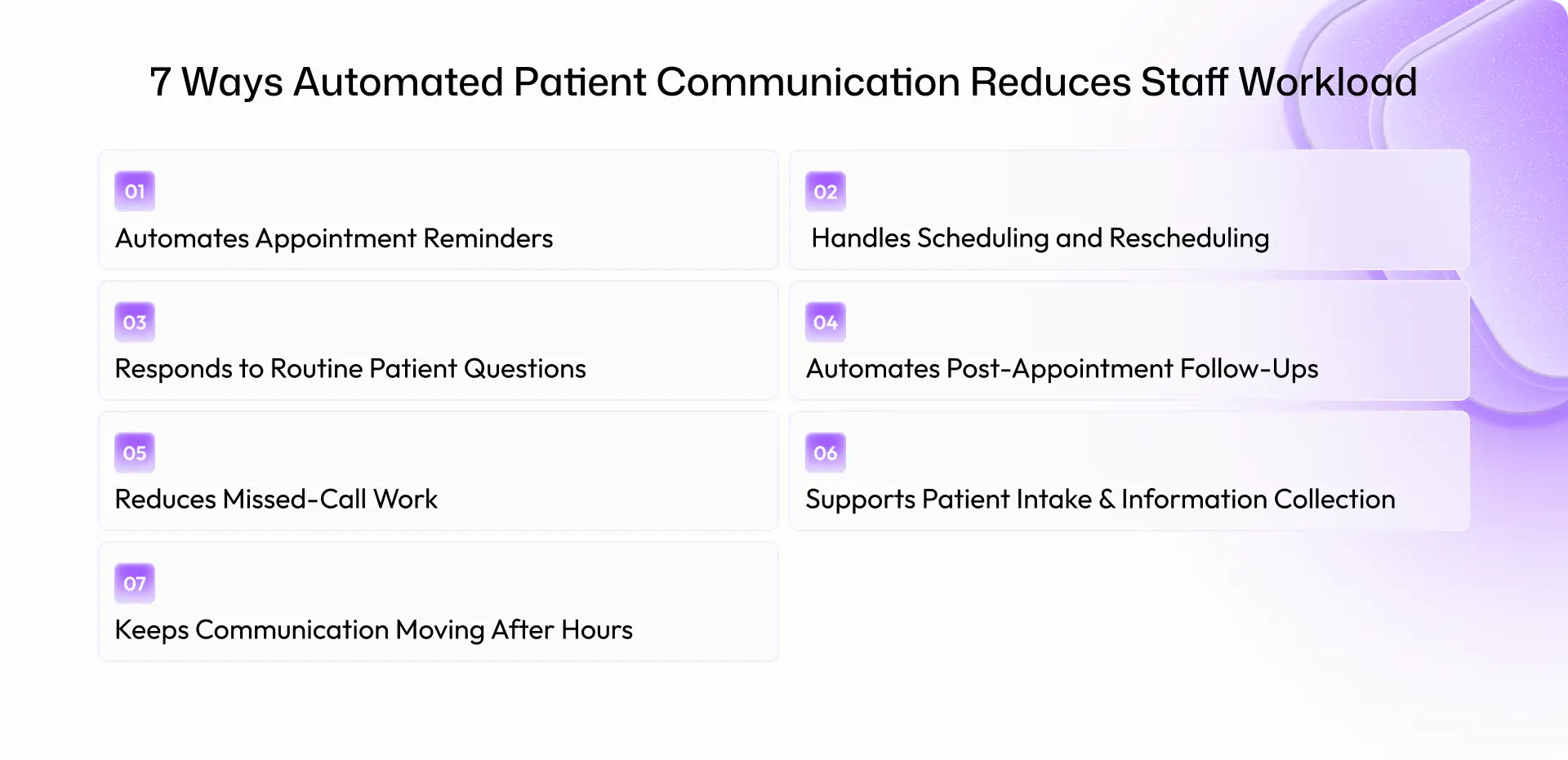
7 Ways Automated Patient Communication Reduces Staff Workload
1. Automates Appointment Reminders
Appointment reminders are one of the easiest communication tasks to automate. Instead of having staff manually call or message every patient, an automated system can send reminders based on the appointment schedule.
Patients can receive a message asking them to confirm, reschedule, or contact the practice if they need help. This means staff don't have to spend large parts of their day making reminder calls.
It can also create a more consistent process. Every patient gets the appropriate reminder instead of relying on someone remembering which patients still need to be contacted.
2. Handles Scheduling and Rescheduling
Scheduling can take more time than it seems. A patient calls. Staff checks availability. The patient asks about another time. Staff checks again. The appointment is moved. Then a confirmation has to be sent.
Do that repeatedly and the time adds up. Automation can handle routine scheduling interactions based on the rules and availability a practice provides.
For example, a patient could request a different appointment time through a phone or messaging interaction. The system can identify the request, check available options, and help complete the approved scheduling workflow. Staff can then step in when something falls outside those rules.
3. Responds to Routine Patient Questions
Healthcare practices answer many of the same questions every day.
What are the office hours?
Where is the clinic?
What services are available?
What should a patient bring to an appointment?
Routine questions don't always require someone from the front desk. An automated communication system can provide approved answers to common questions and direct patients to a staff member when the request is more complicated.
That matters because staff can spend less time repeating basic information and more time helping patients who actually need them.
4. Automates Post-Appointment Follow-Ups
The work doesn't stop when the appointment ends. Patients may need reminders about their next step, follow-up instructions, or a prompt to schedule another appointment.
Instead of relying entirely on staff calendars and manual reminders, practices can create automated workflows around these events.
For example, a follow-up message can be triggered after an appointment and ask whether the patient needs additional assistance.
If the response is routine, automation can continue the workflow. If the patient raises an issue that needs attention, the conversation can be routed to staff. That small distinction is important. Automation handles the predictable part. People handle the exceptions.
5. Reduces Missed-Call Work
Missed calls are frustrating for both sides. A patient calls because they need something. The staff member is already helping another patient. The call goes unanswered. Now someone has to remember to call back. And the patient may try again before that happens.
AI front desk for clinics can respond to missed calls, capture the reason for the call, and collect basic information so the practice knows what the patient needs.
Instead of a vague "call this patient back," staff may receive a clearer request such as a scheduling question or a request for information. That can make callbacks faster and easier to prioritize.
6. Supports Patient Intake and Information Collection
Collecting basic patient information can also create repetitive work. Staff may spend time asking the same preliminary questions, sending forms, checking whether information has been received, or following up with patients who haven't completed a required step.
Some of this process can be automated. Patients can receive instructions or requests for information before their appointment. The system can track the workflow and remind patients when appropriate. Staff still have oversight, but they don't have to manually chase every incomplete step.
7. Keeps Communication Moving After Hours
Patients don't always contact a practice between 9 and 5. Someone might call after work to schedule an appointment or send a message late in the evening.
That doesn't mean a clinic needs staff working around the clock. Automation can acknowledge the request, answer approved routine questions, collect the patient's intent, or begin an appropriate workflow.
The practice can then follow up when staff is available. This creates a better experience than simply leaving the patient with no response. More importantly, it prevents every after-hours interaction from becoming a manual task waiting on the next business day.
What Patient Communication Tasks Should Stay With Staff?
Automation shouldn't handle everything. Healthcare communication can involve sensitive information, clinical concerns, and situations where context matters. Those shouldn't be reduced to a simple automated response.
Complex or Sensitive Patient Questions
If a patient's request is complicated or sensitive, it should be routed to an appropriate person.
Clinical Decisions and Medical Advice
Automated communication should not replace qualified healthcare professionals when a patient needs medical advice, diagnosis, or clinical decision-making.
Situations Requiring Empathy or Human Judgment
Sometimes a patient simply needs to talk to someone who can listen and understand the situation. That isn't a failure of automation. It's exactly where human interaction belongs.
Escalations and Exceptions
Good automation needs clear boundaries. When a request falls outside the approved workflow, the system should know when to stop and involve staff.
That is one of the biggest differences between useful automation and automation that creates more problems than it solves.
How AI Voice Agents Take Patient Communication Further
Traditional automation is good at following rules. AI voice agents can make communication more flexible by understanding what a patient is trying to accomplish and taking the next approved action. Think of the difference this way:
Basic automation: "Send a reminder 24 hours before an appointment."
AI voice agent: "Understand what the patient needs, determine the appropriate workflow, take the approved action, and escalate if necessary."
For example, imagine a patient calls to reschedule an appointment.
A voice AI could understand the request, check the available options, help the patient choose a new time, confirm the change, and send the updated information. If something unusual happens, it can hand the conversation to staff.
That is where AI becomes more interesting for healthcare operations. The value isn't just having a system that talks. It's having one that can help move a workflow forward.
Automated Patient Communication vs. Manual Communication
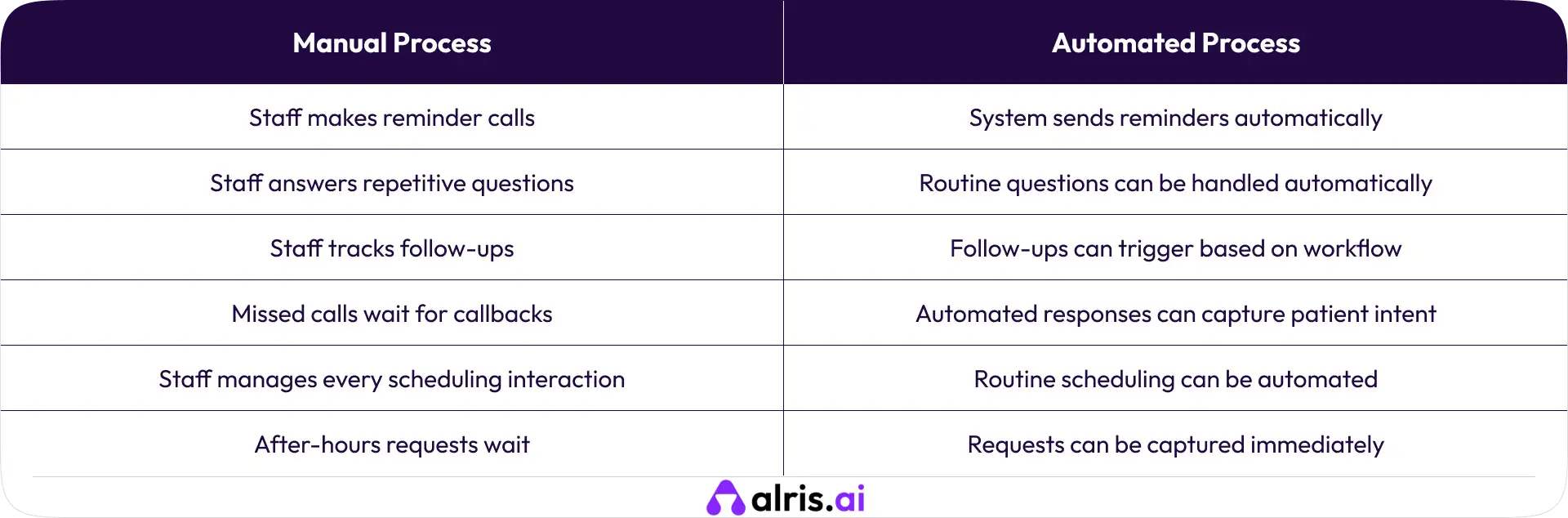
The goal isn't to make the right side completely replace the left. It's to move repetitive work away from staff wherever it makes sense. That gives employees more time for patients who need actual human assistance.
How to Start Automating Patient Communication
A practice doesn't need to automate everything on day one. A smaller starting point is usually more practical.
Step 1: Identify Repetitive Communication Tasks
Look at the calls, messages, and follow-ups staff handle every day. Which ones are predictable? Start there.
Step 2: Measure the Current Workload
Track how much time staff spend on calls, reminders, follow-ups, and scheduling. Without a baseline, it's difficult to know whether automation is actually helping.
Step 3: Start With Low-Risk Workflows
Appointment reminders, confirmations, routine FAQs, and basic follow-ups are often good starting points.
Step 4: Define Escalation Rules
Decide when automation should stop and a staff member should take over. These rules are especially important in healthcare.
Step 5: Connect Automation With Existing Systems
Communication automation works best when it can fit into the systems the practice already uses, rather than creating another disconnected workflow.
Step 6: Monitor Results and Improve
Track metrics such as:
Number of calls handled
Missed calls
Staff time spent on communication
Appointment confirmations
No-show rate
Follow-up completion
Patient response rate
Escalation rate
Then adjust the workflows based on what actually happens.
Common Mistakes When Automating Patient Communication
Automating Everything at Once: Trying to automate every patient interaction immediately can create unnecessary complexity. Start small. Learn what works.
Ignoring Human Escalation: Patients should have a clear path to a person when they need one.
Focusing Only on Cost Savings: Saving staff time matters, but so does patient experience and service quality.
Using Poorly Designed Patient Conversations: If patients have to repeat themselves or fight through confusing prompts, the automation becomes another source of frustration.
Not Measuring the Baseline: Without knowing how much time a process currently takes, it's hard to measure improvement.
Treating Automation as a Replacement for Staff: This is probably the biggest mistake. Healthcare practices still need people. Automation should remove repetitive work so those people can focus on work that requires judgment, empathy, and attention.
Final Thought
Patient communication will always be an important part of healthcare. But not every reminder needs a phone call from a staff member. Not every scheduling request needs a long back-and-forth. And not every routine question needs someone to stop what they're doing and answer the phone.
Automated patient communication can take care of those predictable interactions while keeping staff involved where they matter most.
The real opportunity is not to remove people from the patient journey. It's to remove some of the unnecessary work surrounding it.
For practices exploring AI agents, the next step is to look at the communication workflows that consume the most staff time and identify which ones can safely be handled automatically.
Frequently Asked Questions (FAQs)
1. How does automated patient communication reduce staff workload?
It handles repetitive communication tasks automatically, reducing the number of calls, messages, reminders, and follow-ups staff needs to manage manually.
2. What patient communication tasks can be automated?
Common examples include appointment reminders, confirmations, scheduling requests, rescheduling, routine questions, follow-ups, missed-call responses, and basic information collection.
3. Can AI handle patient appointment scheduling?
AI can assist with approved scheduling and rescheduling workflows when connected to the appropriate systems and rules. Requests that require human judgment can be escalated to staff.
4. Does patient communication automation replace front-desk staff?
No. The goal is to reduce repetitive administrative work, allowing front-desk teams to spend more time on patients and situations that require human judgment.
5. How should a clinic start automating patient communication?
Start with repetitive, low-risk workflows such as reminders, confirmations, routine questions, or follow-ups. Measure the current workload, define escalation rules, and expand automation gradually based on results.
Shravan Rajpurohit
CEO & Co-Founder
Shravan Rajpurohit is the Co-Founder & CEO of The Intellify, a leading Custom Software Development company that empowers startups, product development teams, and Fortune 500 companies. With over 10 years of experience in marketing, sales, and customer success, Shravan has been driving digital innovation since 2018, leading a team of 50+ creative professionals. His mission is to bridge the gap between business ideas and reality through advanced tech solutions, aiming to make The Intellify a global leader. He focuses on delivering excellence, solving real-world problems, and pushing the limits of digital transformation.

Stay Updated
with AI Insights
Get the latest articles on AI, automation, and enterprise technology delivered to your inbox weekly.

500+ people have already subsribed!
No spam. Unsubscribe anytime.