
How Clinics Can Automate Post-Appointment Follow-Ups



Summary: Clinics can automate post-appointment follow-ups to reduce repetitive administrative work and keep patient communication consistent. From reminders and scheduling to check-ins, feedback, and routine follow-up calls, automation can handle predictable tasks while staff manage situations that need human attention. AI-powered workflows can make these interactions more responsive without replacing the human side of patient care.
A patient leaves the clinic, the appointment is marked complete, and the team moves on to the next patient.
But the work isn't really over. There may still be a follow-up call to make, instructions to send, another appointment to schedule, or a referral to check. When all of this is handled manually, routine follow-up can quickly become a burden for clinic staff.
Patient follow-up automation gives clinics a way to handle these repetitive tasks through structured workflows, software, or AI while keeping staff involved when human attention is needed.
The goal isn't to automate every patient interaction. It's to make sure routine follow-up doesn't get forgotten.
Why Post-Appointment Follow-Up Matters for Clinics
The appointment is only one part of the patient journey. What happens afterward can affect communication, scheduling, and the overall workflow of the practice.
Patients Often Need Help After the Visit
Questions don't always come up while a patient is sitting in the exam room.
They may get home and realize they forgot an instruction, need to schedule another visit, or aren't sure what happens next. A timely follow-up gives them another opportunity to get the information they need.
Manual Follow-Ups Put Pressure on Clinic Staff
Follow-up can involve dozens of small tasks:
Calling patients
Sending messages
Scheduling appointments
Checking referrals
Collecting feedback
Documenting conversations
Following up with patients who didn't respond
Each task may seem minor. Together, they take a fair amount of staff time. And when the phones are already busy, follow-up work can easily get pushed to later.
Missed Follow-Ups Can Create Gaps in Patient Communication
Manual processes depend on people remembering what needs to happen and when. A task can be missed because someone is helping another patient, dealing with an urgent request, or simply has too many things on their list.
Automation creates a repeatable process, so routine follow-up doesn't depend entirely on someone's memory.
What Is Patient Follow-Up Automation?
Patient follow-up automation uses software, workflows, or AI to manage predefined communication and tasks after an appointment.
Depending on the clinic, this may include:
Post-visit messages
Appointment reminders
Patient check-ins
Follow-up scheduling
Feedback collection
Referral reminders
Routine administrative questions
There are different levels of automation.
Manual follow-up: means staff handle each interaction themselves.
Basic automation: uses predefined triggers. For example, a reminder may automatically be sent 24 hours after an appointment.
AI-powered follow-up: can go further. An AI agent can have a conversation, understand a patient's response, complete certain approved actions, and escalate the interaction when it falls outside the workflow.
That difference is important. A reminder sends information. An AI workflow can potentially help move the conversation forward.
What Can Clinics Automate After an Appointment?
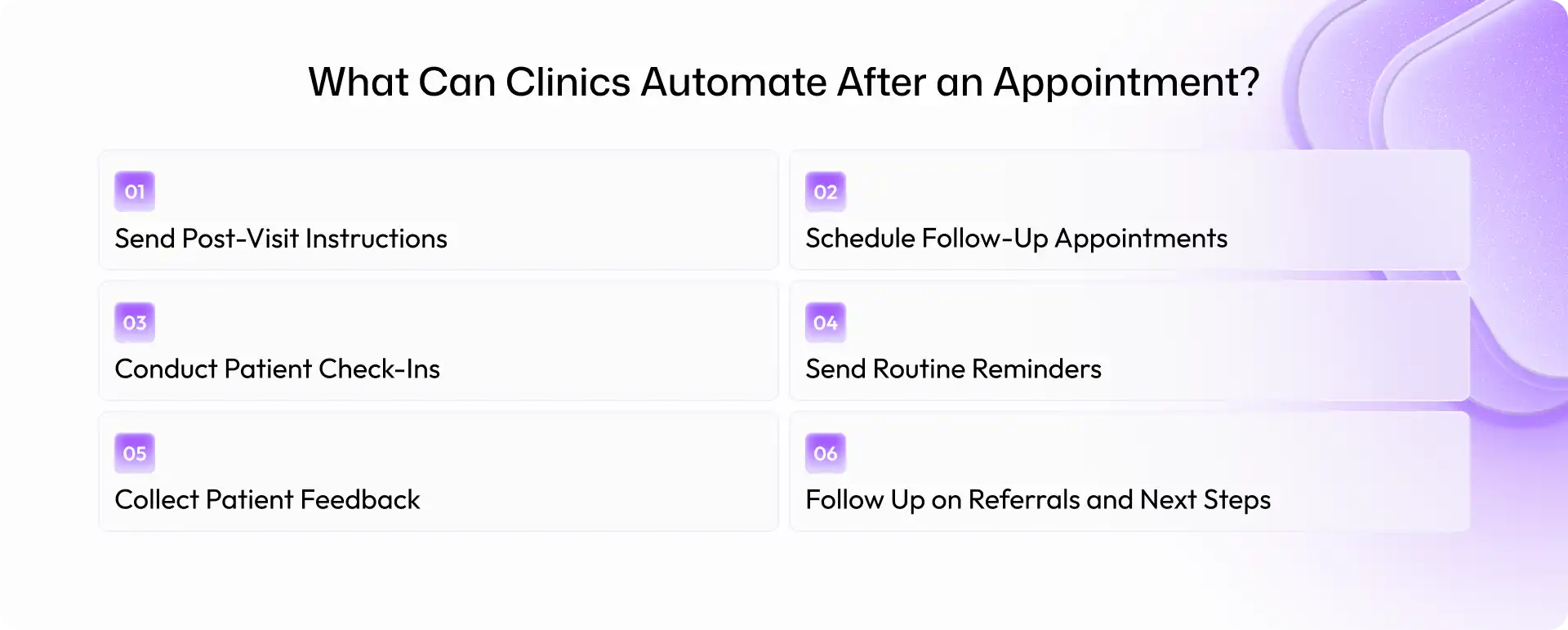
A lot of post-appointment work is repetitive and predictable. Those tasks are often the best starting point for automation.
Send Post-Visit Instructions
Clinics can automatically send approved information after an appointment, such as instructions, educational resources, or links to the next step.
This helps make sure patients receive important information without requiring staff to send every message manually.
Schedule Follow-Up Appointments
If a patient needs another visit, an automated workflow can remind them and help move the scheduling process forward.
AI can also assist with routine scheduling conversations when the appropriate scheduling rules and system access are in place.
Conduct Patient Check-Ins
A clinic can schedule an automated check-in after a visit.
For example: "Hi, we're checking in after your recent visit. Do you have any questions about your next steps?"
A routine response can continue through the workflow, while a request that needs staff attention can be escalated.
Send Routine Reminders
Clinics can automate reminders related to appointments, referrals, tests, or other predefined next steps. This reduces the number of individual reminders staff has to remember and send.
Collect Patient Feedback
A short follow-up message can also be used to collect patient feedback after an appointment. The goal isn't to send another long survey. A simple, well-timed question can give the clinic useful information without creating more work for staff.
Follow Up on Referrals and Next Steps
Patients may leave an appointment with a referral or another action to complete. An automated workflow can remind them about the next step and flag outstanding items for the clinic team.
How AI Can Improve Patient Follow-Up Automation
Basic automation works well when the process follows a fixed path. Patients, however, don't always respond in neat yes-or-no answers. That's where AI can make follow-up more conversational.
AI Can Have a Conversation, Not Just Send a Message
Traditional automation might send: "Your follow-up appointment is due."
An AI-enabled workflow could potentially ask whether the patient wants to schedule and respond to what they say. For routine administrative interactions, this can make the process feel less rigid.
AI Can Handle Routine Follow-Up Calls
AI voice agents can support defined workflows such as:
Post-appointment check-ins
Scheduling requests
Routine reminders
Confirmation calls
Feedback collection
This can reduce the number of repetitive calls handled manually by front-office staff. And yes, making the same type of call dozens of times a day gets tiring.
AI Can Understand Patient Responses
AI can be configured to identify different types of responses. For example:
"Everything is fine." → Routine follow-up.
"I need to change my appointment." → Scheduling workflow.
"I need to speak with someone about my situation." → Staff escalation.
The exact workflow depends on what the clinic approves the system to handle.
AI Can Escalate When a Human Is Needed
AI should have clear limits. Clinical questions, urgent concerns, medication-related decisions, or situations outside the approved workflow may require a qualified member of the clinic team. A well-designed workflow should make that handoff clear rather than trying to answer everything automatically.
Benefits of Automating Patient Follow-Ups
1. Reduce Repetitive Administrative Work
Staff can spend less time making routine calls, sending reminders, and tracking follow-up tasks manually.
2. Make Follow-Up More Consistent
A defined workflow can follow the same process every time, reducing dependence on individual staff members remembering each task.
3. Respond to Patients Faster
Automated workflows can start communication based on predefined triggers instead of waiting for someone to become available.
4. Reduce Missed Follow-Up Tasks
When follow-ups are triggered automatically, fewer tasks depend on someone's personal to-do list.
5. Give Staff More Time for Patients
This is one of the clearest benefits. When routine work is handled through automation, staff can focus on patients and situations that need direct human attention.
6. Handle Higher Patient Volumes
A structured automated workflow can support larger volumes of routine communication without increasing manual effort at the same pace.
What Clinics Should Not Automate Without Human Oversight
Automation needs boundaries, particularly in healthcare.
Clinical Decisions
AI should not independently diagnose patients or make clinical decisions that require professional judgment.
Medication-Related Decisions
Medication changes and dosage-related questions should be handled through appropriate clinical workflows and qualified professionals.
Urgent or Emergency Situations
Clinics should define clear escalation procedures for urgent concerns rather than relying on an automated conversation to manage them.
Sensitive Patient Concerns
Some conversations simply need a person. Patients should have a clear path to reach appropriate clinic staff when necessary.
Privacy and Security
Clinics should also evaluate how patient information is collected, stored, accessed, and transferred when introducing automation.
For organizations covered by HIPAA, the HHS Security Rule requires appropriate administrative, physical, and technical safeguards for electronic protected health information. HHS HIPAA Security Rule guidance
Any technology used in patient workflows should therefore be reviewed against the clinic's privacy, security, compliance, and risk requirements.
Patient Follow-Up Automation vs. Manual Follow-Up
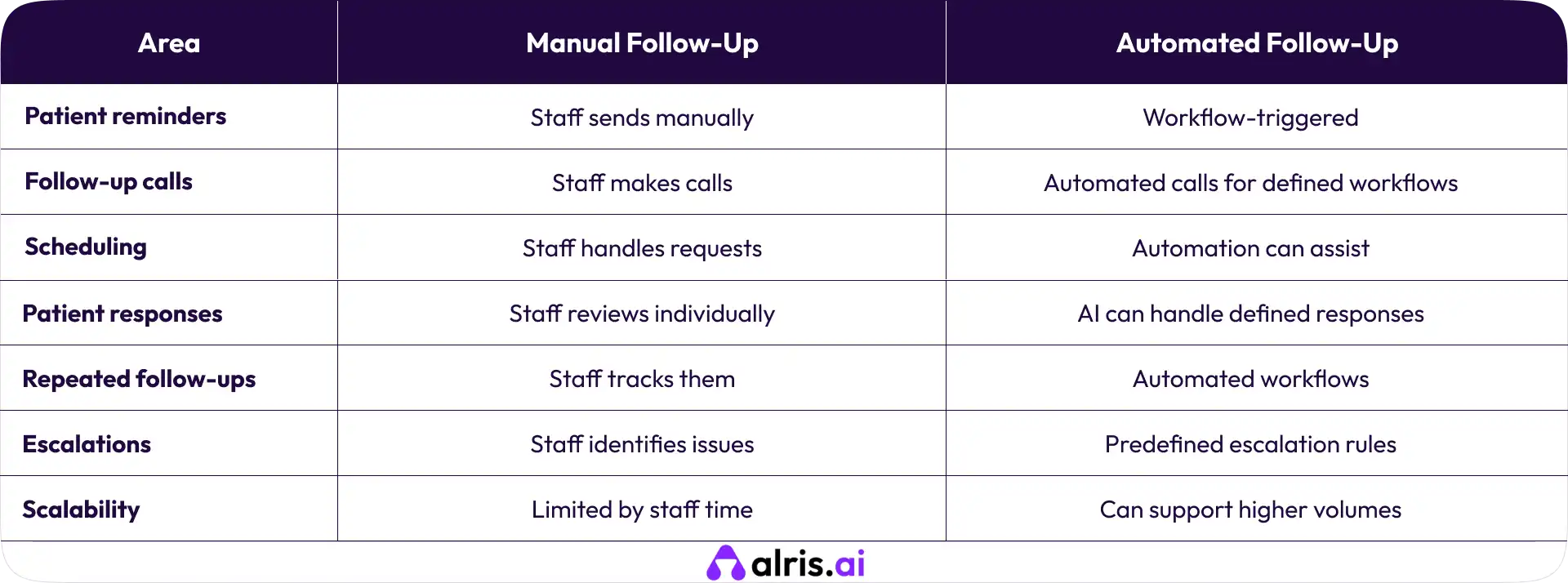
Automation isn't automatically the right answer for every interaction. It works best where the task is repetitive, predictable, and clearly defined.
How to Start Automating Patient Follow-Ups
Clinics don't need to automate everything at once. Starting with one workflow is usually much easier.
1. Map Your Current Follow-Up Process
Document what happens after an appointment, who handles each task, and where delays occur.
2. Identify Repetitive Tasks
Look for tasks that happen frequently and follow a predictable pattern. These are usually the easiest places to start.
3. Separate Administrative and Clinical Work
Identify what can be handled through automation and what requires clinical judgment or staff involvement.
4. Start With One Workflow
Choose one practical use case, such as:
Post-visit check-ins
Appointment scheduling
Feedback collection
Routine reminders
Get that process working before expanding.
5. Define Escalation Rules
Decide when the system should hand a conversation to staff and who should receive the request. This should be defined before the workflow goes live.
6. Connect Automation With Existing Systems
Where appropriate, automation should work with the clinic's existing scheduling, EHR, practice-management, and communication systems instead of creating another disconnected process.
7. Measure and Improve
Track practical metrics such as:
Follow-up completion rate
Patient response rate
Staff time spent
Scheduling completion
Escalation rate
Use those results to improve the workflow over time.
How Alris AI Can Automate Patient Follow-Ups
For clinics looking beyond simple reminders, Alris AI can support AI-powered workflows around patient communication and routine operational tasks.
A workflow could start with a post-appointment check-in, continue through a patient conversation, assist with a routine scheduling request, and route the interaction to staff when human attention is needed.
Depending on the workflow, this can include:
AI-powered patient conversations
Automated follow-up calls
Patient check-ins
Appointment scheduling
Follow-up reminders
Task extraction
Workflow execution
Human escalation
The focus should be on the workflow, not simply adding another communication tool. If a task is repetitive and predictable, AI can potentially handle it. If it requires judgment, the workflow should involve a person.
Final Thoughts
Post-appointment follow-up doesn't have to become another long list of tasks for the front desk.
Clinics can automate routine reminders, check-ins, scheduling requests, feedback collection, and other repeatable work. AI can take this further by handling conversations instead of simply sending one-way messages.
But the goal isn't to automate everything. It's to remove repetitive work, so clinic staff have more time for the patients and situations that need a human.
Start with one workflow. Define the boundaries. Set clear escalation rules. Measure the results. Then build from there.
Frequently Asked Questions (FAQs)
1. What is patient follow-up automation?
Patient follow-up automation uses software, workflows, or AI to manage routine communication and tasks after an appointment, including reminders, check-ins, scheduling, and feedback.
2. Can clinics automate post-appointment follow-ups?
Yes. Clinics can automate many routine tasks after an appointment, including messages, reminders, check-ins, scheduling requests, and feedback collection.
3. What patient follow-up tasks can be automated?
Common examples include appointment reminders, follow-up scheduling, routine check-ins, feedback requests, referral reminders, and administrative communication.
4. Can AI make follow-up calls to patients?
AI voice agents can handle defined follow-up conversations such as routine check-ins, reminders, scheduling, and feedback collection, with appropriate escalation rules.
5. Can AI schedule follow-up appointments?
AI can assist with scheduling when it is connected to an appropriate scheduling workflow and has clearly defined rules. More complex requests can be routed to staff.
6. Does patient follow-up automation replace clinic staff?
No. The purpose is to reduce repetitive administrative work while keeping staff involved in clinical decisions, sensitive conversations, exceptions, and other situations requiring human judgment.
Shravan Rajpurohit
CEO & Co-Founder
Shravan Rajpurohit is the Co-Founder & CEO of The Intellify, a leading Custom Software Development company that empowers startups, product development teams, and Fortune 500 companies. With over 10 years of experience in marketing, sales, and customer success, Shravan has been driving digital innovation since 2018, leading a team of 50+ creative professionals. His mission is to bridge the gap between business ideas and reality through advanced tech solutions, aiming to make The Intellify a global leader. He focuses on delivering excellence, solving real-world problems, and pushing the limits of digital transformation.

Stay Updated
with AI Insights
Get the latest articles on AI, automation, and enterprise technology delivered to your inbox weekly.

500+ people have already subsribed!
No spam. Unsubscribe anytime.